PDF & documents7 min read
Microsoft Publisher is retired: how to open your .pub files now
Publisher leaves Microsoft 365 on 1 October 2026. Who is affected, which options still open .pub files, and how to convert a whole archive to PDF.
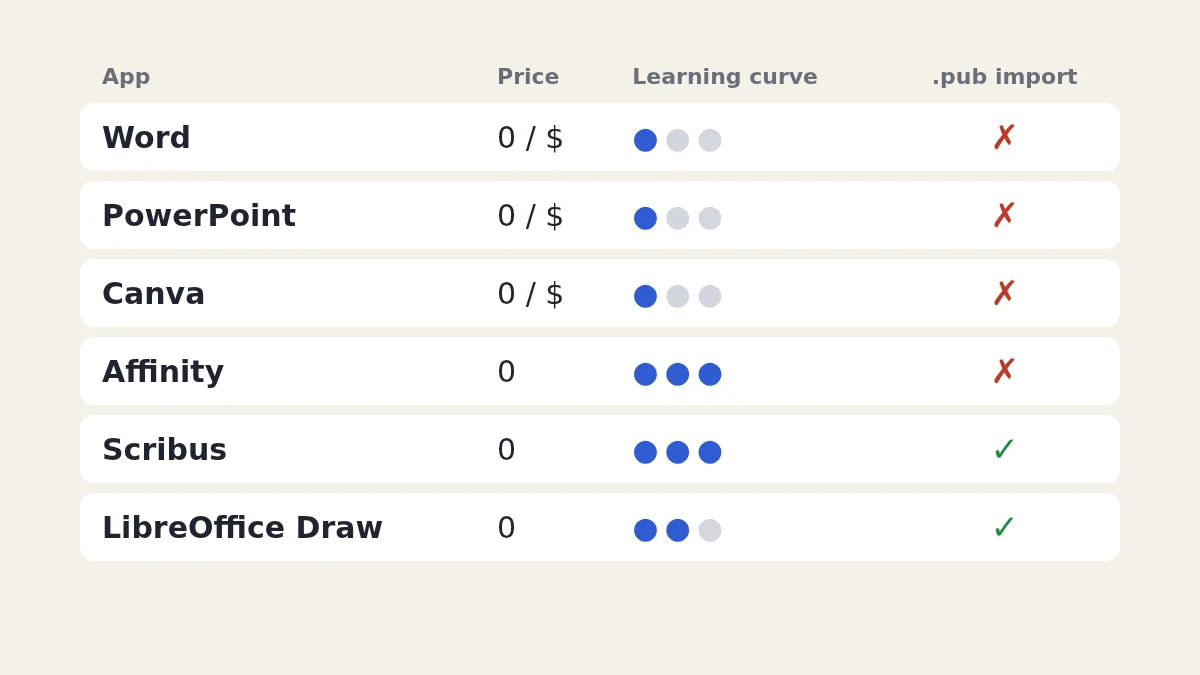
Only two Publisher alternatives open .pub files directly: LibreOffice Draw and Scribus, both free. Microsoft recommends Word and PowerPoint, Canva is the easiest to learn, and Affinity is now a free professional layout app. Whichever you pick, convert your .pub files to PDF or an editable format first, because none of them keeps a Publisher layout perfectly.
Checked on 30 September 2026. Prices are those shown at the time of writing (September 2026) and differ by country. Omnvert is not affiliated with Microsoft, Canva or any of the other vendors named here; product names are used only to describe compatibility.
Whatever you move to, do one thing first: get your old work out of the .pub format while you can still check it. The Omnvert Publisher converter turns .pub files into PDF or editable ODG in bulk, and you can see page 1 of up to 20 files before paying. Microsoft's retirement notice says Microsoft 365 subscribers lose access to Publisher after 1 October 2026, so the files you still have are the ones worth saving. Who is affected, and what happens to perpetual Office licences, is covered in how to open your .pub files now that Publisher is retired.
| App | Price at the time of writing | Learning curve | Opens .pub files? |
|---|---|---|---|
| Word | In Microsoft 365 (Personal: US$99.99 a year or US$9.99 a month in the US store); free web version | Low if you already know Word | No; Microsoft's route is .pub to PDF to Word |
| PowerPoint | Same subscription; free web version | Low | No; bring pages in as PDF or images |
| Canva | Free plan; Pro is a paid monthly or yearly subscription, priced by country | Lowest | No; imports PDF |
| Affinity | Free for individuals; optional AI tools need a Canva premium plan | Steep for beginners | No; imports PDF, IDML and Word files |
| Scribus | Free, open source | Steep | Yes, through its Publisher importer |
| LibreOffice Draw | Free, open source | Moderate | Yes, Publisher 98-2010 files |
The learning-curve column is our own assessment for someone coming from Publisher, not a vendor claim. The .pub column is what each vendor documents: only Scribus and LibreOffice Draw read the format, and neither promises a perfect copy.
Microsoft's own table of replacements sends newsletters, letterheads, envelopes, labels, forms and folded programmes to Word, and banners, signs and posters to PowerPoint; flyers, brochures, certificates, business cards, calendars and greeting cards can go to either. Both come with a Microsoft 365 subscription, and Microsoft offers free web versions of Word and PowerPoint with a Microsoft account.
The catch is the model. Word is text-first: the page is built from flowing text, and pictures and text boxes are anchored to paragraphs, so a layout can move when the text changes. That suits a newsletter with a steady structure and frustrates anyone who placed everything by hand in Publisher. PowerPoint is the opposite: every object sits exactly where you put it on a page of fixed size, which is why it works well for one-page posters and certificates. Set the slide size to A4 or Letter before you start. Neither app opens .pub files. Microsoft suggests saving the .pub as PDF and opening that in Word, and warns that the layout may differ, especially with many graphics. Without desktop Word, our PDF to Word converter does that step.
Canva runs in the browser, starts from templates and is the quickest way to produce a flyer or a social post if you never enjoyed Publisher's menus. It has a free plan; Pro is a paid subscription billed monthly or yearly, and the price depends on your country, so check it on Canva's own pricing page. Canva does not open .pub files. It imports PDFs, and its help centre says text and images may be separated into editable elements, that scanned PDFs come in as a single flat image, and that unsupported fonts may be replaced. Converting your .pub to PDF first, then importing the PDF, is the practical route.
Affinity, which Canva owns, now combines vector design, photo editing and page layout in one app and states on its website that it is free for individuals, on Mac and Windows. Optional AI tools inside Affinity need a Canva premium plan. This is the closest thing to a professional desktop publishing program without a subscription, and the learning curve reflects that: expect a few evenings before you are faster than you were in Publisher. Affinity's documented import formats include PDF, InDesign IDML and Word DOCX, but not .pub, so the route again goes through PDF.
Scribus is free, open-source layout software for Windows, macOS and Linux, built with print in mind: CMYK colour, spot colours and PDF/X export for print shops. Its interface is older and less forgiving than Publisher's. It is one of only two options here with a .pub importer, which uses the same open library as LibreOffice and converts Publisher vector content into Scribus objects. Treat an import as a starting point: text frames, fonts and spacing usually need tidying.
Draw is part of the free LibreOffice suite, whose current release at the time of writing is 26.8. It is page-based and lets you place text boxes, shapes and pictures freely, which feels familiar to Publisher users doing one- and two-page items. The LibreOffice documentation lists Microsoft Publisher 98-2010 among the formats Draw opens, and its own ODG format is what Omnvert produces when you choose the editable output. For long documents with text flowing across many pages, Word or Scribus is the better fit.
For steps 2 and 4, convert your .pub archive to PDF or ODG with the bulk converter. Drop files, a folder or a ZIP of folders; the result ZIP keeps your folder structure, and a CSV and HTML report lists each file's status, page count, fonts used, fonts replaced and warnings. The first file each day is free at full quality with no watermark; beyond that the site's existing plans apply (a 3-file credit pack, a 24-hour Day Pass, or Pro), with current prices shown on the converter page. If the archive ends up as many PDFs, you can merge them or turn pages into images for the web.
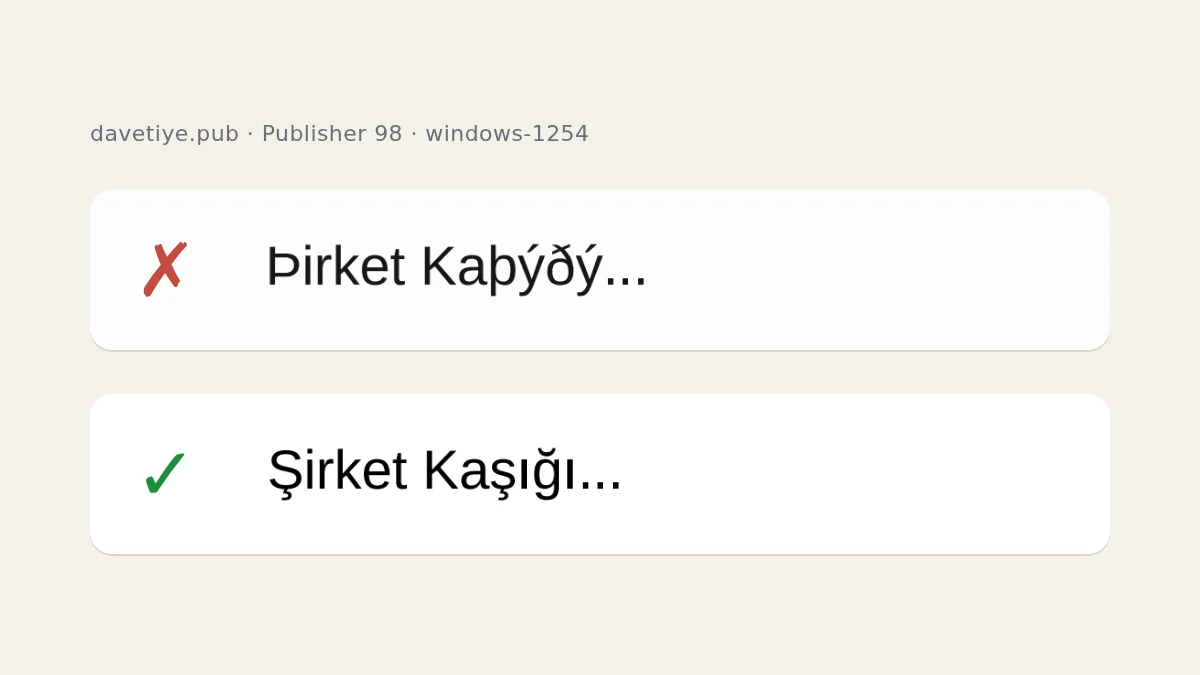
Publisher 97 and 98 stored text in the Windows code page of the PC that saved the file. Opened with the wrong assumption, Turkish "Şirket Kaşığı" becomes "Þirket Kaþýðý", and Russian or Greek text turns into accented Latin letters. Omnvert decodes these files correctly, including Cyrillic, Greek, Hebrew, Arabic and Central European text, which matters if you are rebuilding from files older than 2000.
No route keeps a Publisher layout perfectly. Complex layouts can shift, linked text boxes (newsletter columns, "continued on page 2") may repeat their text in each box in the current version of our converter, and the report warns when that happens. WordArt and some embedded objects may be simplified. If you still have a perpetual Office licence with Publisher, File > Save As > PDF from Publisher itself gives the most faithful archive copy; Microsoft's bulk-export script also needs that installed Publisher. Conversion on Omnvert runs on our server in an isolated LibreOffice container with no network access, and files are deleted on a fixed schedule (outputs 15 minutes after download, originals within 120 minutes).
For page layout, Affinity (free for individuals) and Scribus (open source) are the closest. For opening existing .pub files, LibreOffice Draw and Scribus are the only two here that import them. For quick flyers, Canva's free plan is the easiest start.
Word or PowerPoint, depending on the job: Word for newsletters, letterheads, labels, envelopes and forms, PowerPoint for banners, signs and posters, and either for flyers, brochures, certificates, business cards and calendars. Microsoft also points to templates on Microsoft Create.
No. Both import PDF, so convert the .pub file to PDF first. Canva notes that text and images may become separate editable elements, while scanned PDFs arrive as one flat image.
Affinity's website says it is free for individuals on Mac and Windows. Optional AI tools inside the app require a Canva premium plan. Organisations that need single sign-on are pointed to Canva's enterprise and education offers.
Convert everything for the archive, then rebuild only the templates you reuse regularly. A converted file is fine for reading and occasional edits; a template you update every month is worth setting up properly in the new app.
Publisher leaves Microsoft 365 on 1 October 2026. Who is affected, which options still open .pub files, and how to convert a whole archive to PDF.
A PDF has no cells, only positioned glyphs. How extractors infer columns from ruling lines and x coordinates, where that fails, and how to verify the result.
OCR accuracy is set by the image, not the engine: resolution, binarisation, skew, compression artefacts, language data and layout. Plus how to judge the output.