3D printing & STL5 min read
How to reduce STL file size without ruining the print
Why STL files get large, how to read the triangle count straight from the file size, and what binary, re-export, decimation and 3MF each save in practice.
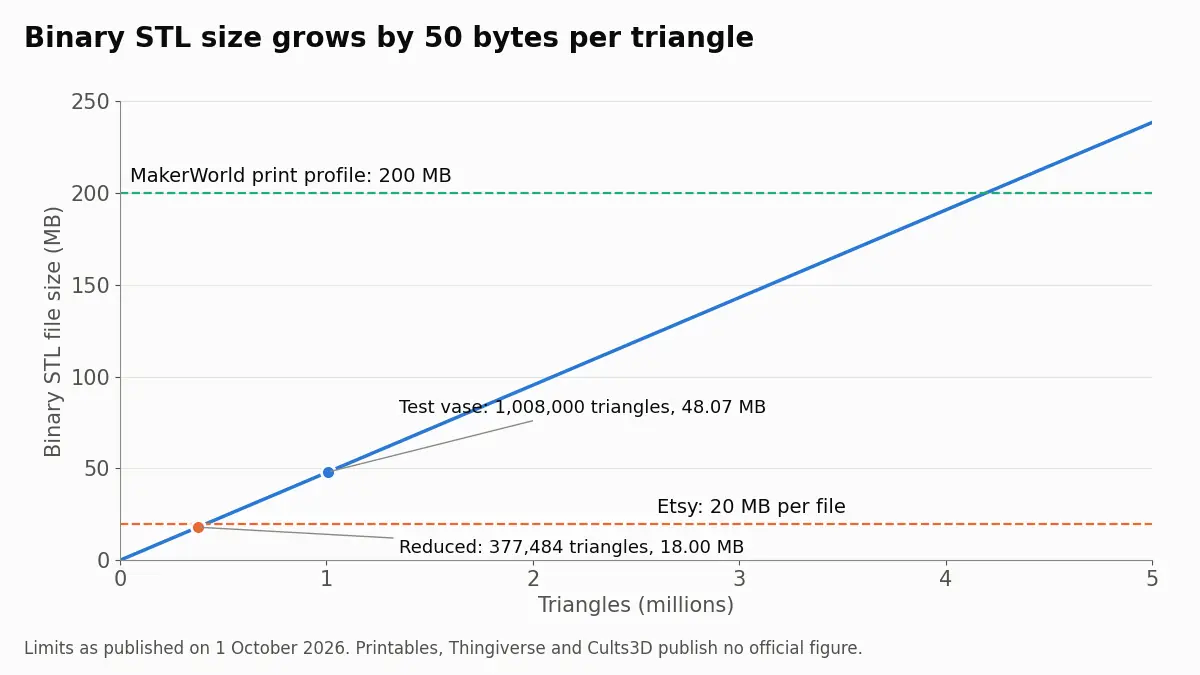
Etsy allows 20 MB per digital file and MakerWorld 200 MB per print profile; Printables, Thingiverse and Cults3D publish no official limit. Reducing the triangle count to a target size, then checking the detail, gets almost any model under the line.
Checked on 1 October 2026 against each platform's own help pages, linked below. Where a platform publishes no limit, this article says so instead of repeating figures from forums.
An STL is refused at upload when it is bigger than the platform's per-file limit. Etsy allows 20 MB per file for digital downloads. MakerWorld allows 200 MB per print profile. Printables, Thingiverse and Cults3D do not publish a limit on an official page. In every case the fix is the same: bring the triangle count down until the file is under the limit with some margin, check that the detail survived, and send a 3MF or ZIP where the platform accepts one. The quickest way to do the first part is to reduce the STL to a target size in MB, which stops as soon as the file fits.
| Platform | Published limit |
|---|---|
| Etsy | 20 MB per file, 5 files per listing |
| MakerWorld | 200 MB per print profile |
| Printables | No official figure found |
| Thingiverse | No official figure found |
| Cults3D | No official figure found |
Etsy's wording is direct: "You can upload up to five digital files. The maximum size for each file is 20MB." Their digital listings help article lists .stl and .zip among the supported types. For MakerWorld, Bambu Lab's MakerWorld release notes record that the print profile limit was raised to 200 MB, and the upload guide lists the accepted file types. MakerWorld does not state a separate limit for raw model files on an official page, and forum posts disagree about it, so we leave it open.
Formats differ too. Etsy's list includes STL and ZIP but not 3MF. MakerWorld accepts STL, 3MF, ZIP, STEP and several CAD formats. We found no official page stating the accepted formats for Printables or Thingiverse, and Cults3D's help pages could not be loaded for checking.
On Etsy the five-file allowance matters as much as the 20 MB cap. A listing can carry up to 100 MB in total, so a large or multi-part model can go out as several STLs, one per part, each under 20 MB. If the model is one piece, the STL splitter cuts it into parts that fit a print bed, and smaller parts usually mean smaller files as well.
Binary STL stores every triangle in a fixed 50 bytes and compresses nothing, so the size is 84 bytes plus 50 bytes per triangle. One million triangles is 48 MB whatever the model looks like. Scans, sculpts, AI-generated models and CAD exports left on the finest setting easily reach that. An ASCII STL of the same geometry is roughly five to six times bigger again, because it writes every number as text.
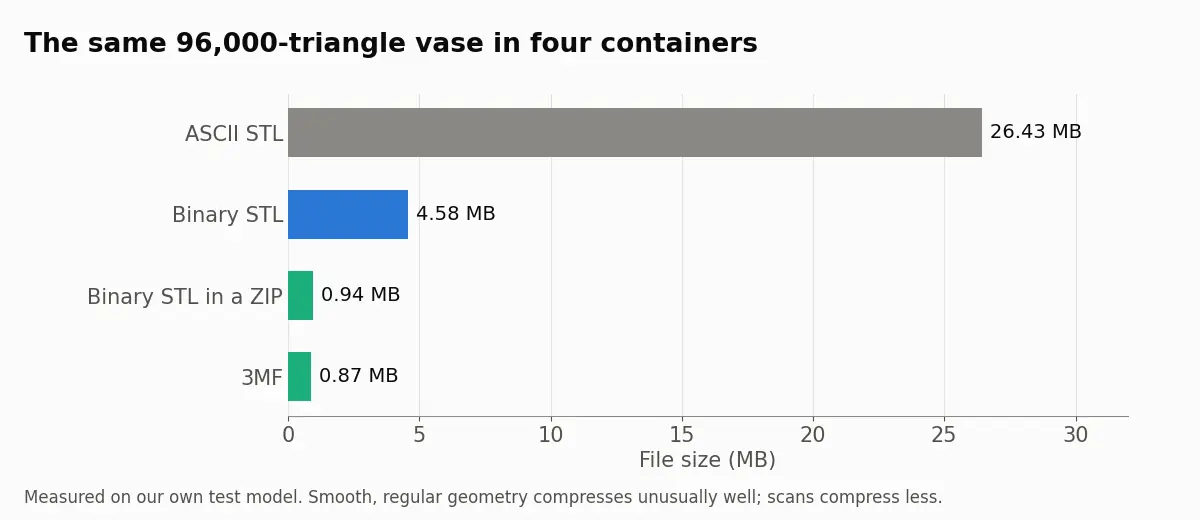
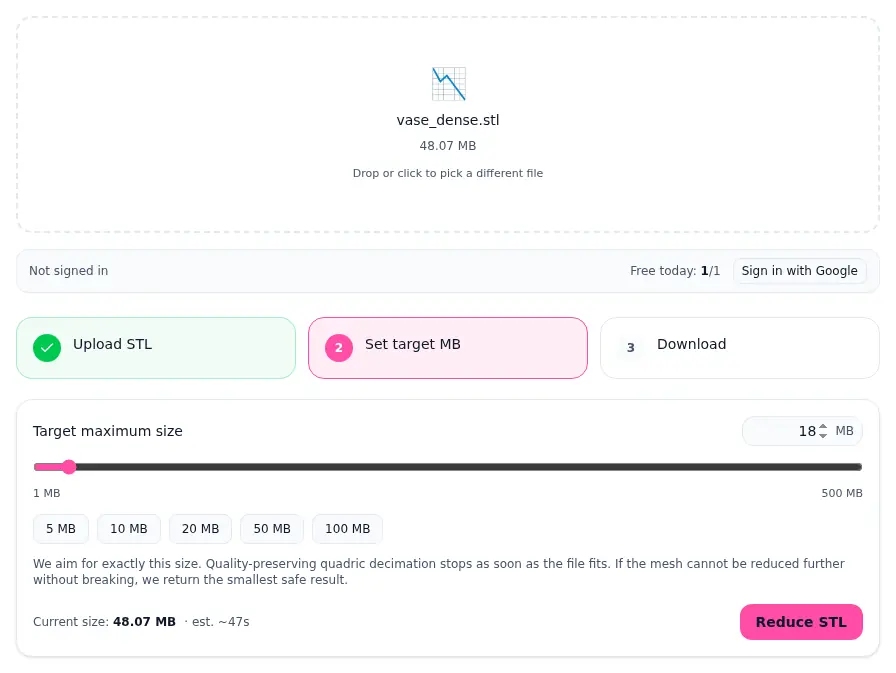
On that vase, the reducer went from 1,008,000 to 377,484 triangles and landed on 18.00 MB. The result card shows which common upload limits the new file clears, so you do not have to work it out.
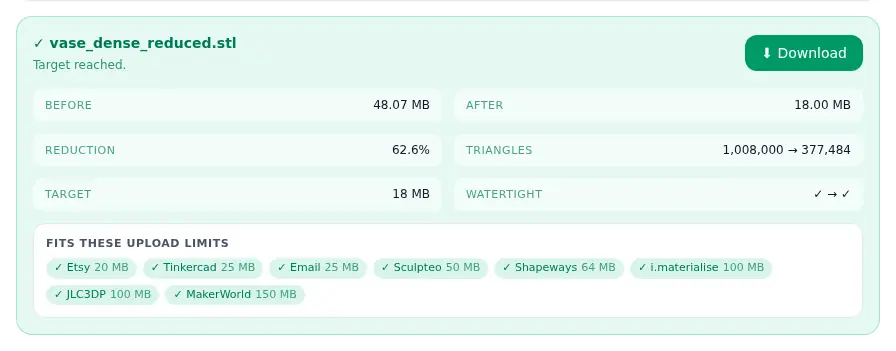
If your own file is over a limit right now, open the STL reducer, set the target a little under the limit and compare before you download.
A 0.4 mm nozzle printing 0.2 mm layers cannot reproduce surface detail much finer than about a tenth of a millimetre, so a lot of what a dense mesh stores never reaches the plastic. Cutting a mechanical part by half is usually invisible in the print. Organic shapes start to show flat facets when you remove most of the triangles, and text or fine relief degrade first. The image below is the same small patch of the test vase at three triangle counts.
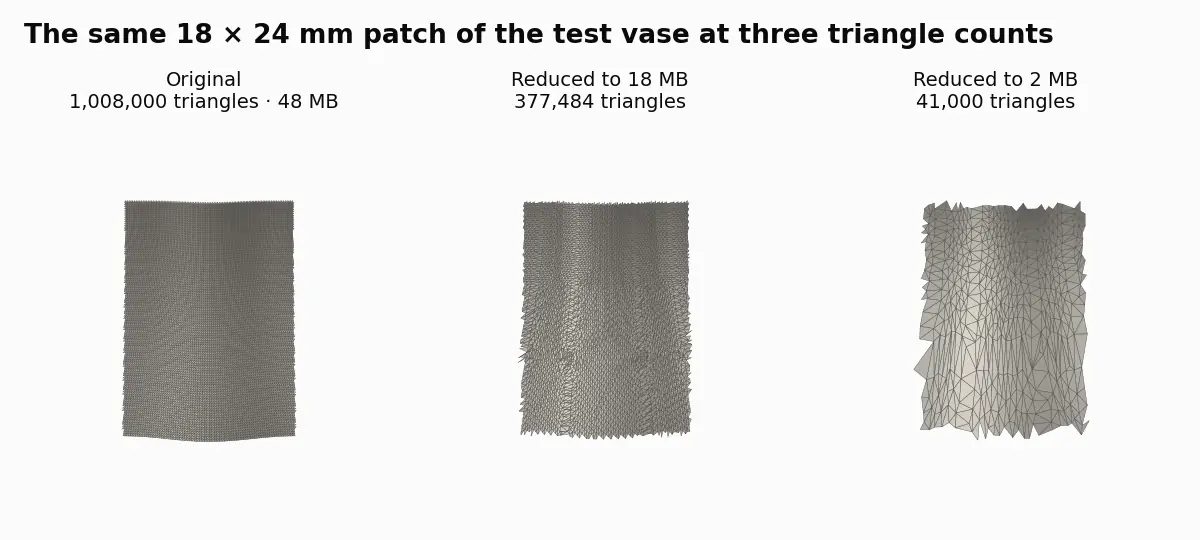
Our guide to reducing STL file size without ruining the print has rules of thumb per model type, and the tutorial on polygon count and print quality explains why more triangles do not mean a better print.
3MF stores each vertex once and compresses the whole file, so the same geometry is often several times smaller than binary STL. It also records units, which STL does not. On MakerWorld a 3MF is the natural choice because a print profile is a 3MF. On Etsy you cannot attach a 3MF, but you can attach a ZIP, and a ZIP of an STL is fully lossless. The comparison of STL, 3MF and OBJ covers what each format keeps.
Zipping helps the upload, not the slicer. The buyer unpacks the archive and the slicer processes the same triangles, so a heavy mesh still slices slowly. Reducing the mesh helps both.
A reducer cannot keep detail that the target size has no room for. A 300 MB photogrammetry scan squeezed into 18 MB will lose fine texture; for that kind of file, splitting it into several listing files or sharing a ZIP is better than one heavily reduced STL. The limits above are what each platform published on 1 October 2026 and can change without notice, and for Printables, Thingiverse and Cults3D we found no official number at all. If an upload still fails after reducing, the platform's error message or support team is the authority, not this table.
Etsy's help page for digital listings says each file can be up to 20 MB and a listing can have up to five files. STL and ZIP are on its list of supported types; 3MF is not. Aim for about 18 MB so a file is not refused at the margin.
Bambu Lab's MakerWorld release notes say the print profile limit was raised to 200 MB in January 2024. MakerWorld does not publish a separate limit for raw model files on an official page, so if an upload fails, reduce the file and try again.
Neither publishes one on an official help page that we could find on 1 October 2026. Upload a reduced copy if the original fails, and use the error message the site shows as the real limit.
Not while the change stays below what your nozzle and layer height can show. Halving a mechanical part is normally invisible. Heavy reduction on organic shapes, lettering or fine relief shows as flat facets, so compare before you upload.
For the upload, often yes: a ZIP of a binary STL can be several times smaller and loses nothing. It does not help the slicer, which still processes every triangle, and some sites do not accept ZIP.
Why STL files get large, how to read the triangle count straight from the file size, and what binary, re-export, decimation and 3MF each save in practice.
What each format really stores, how many bytes the same mesh costs in all three, why units decide most arguments, and the edge cases that break silently.
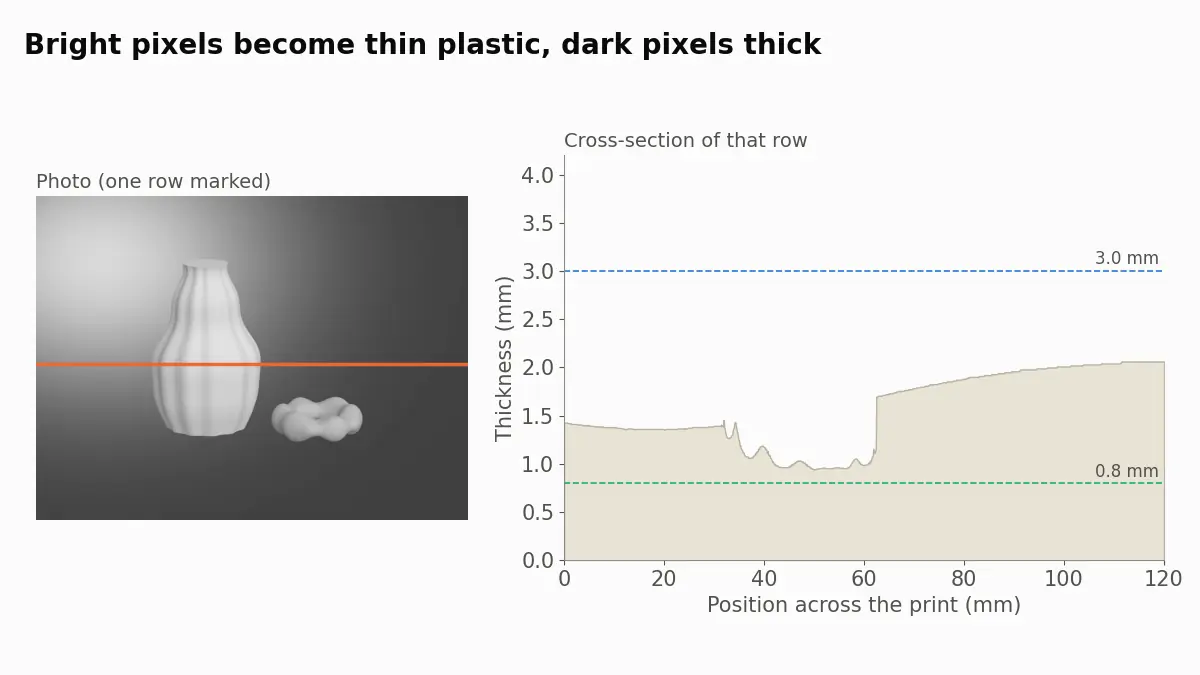
Turn a photo into a lithophane STL: which photo works, 0.8 to 3 mm thickness, print width, white PLA at 100% infill, fine layers, orientation and backlight.