Google Photos to Immich: Keep Dates, GPS and Albums
Immich reads dates and GPS from inside each file, not from Google's Takeout JSON. Fix the Takeout first so the dates are in the files, then upload with the Immich CLI, which can turn folders into albums. immich-go is the command-line alternative that reads the JSON itself.
Prerequisites
- A running Immich server and an API key from its user settings
- All parts of your Google Photos Takeout
- Omnvert Google Takeout Fixer
- Immich CLI (npm i -g @immich/cli) or the Immich web uploader
Step-by-step
- 1
Fix the Takeout first
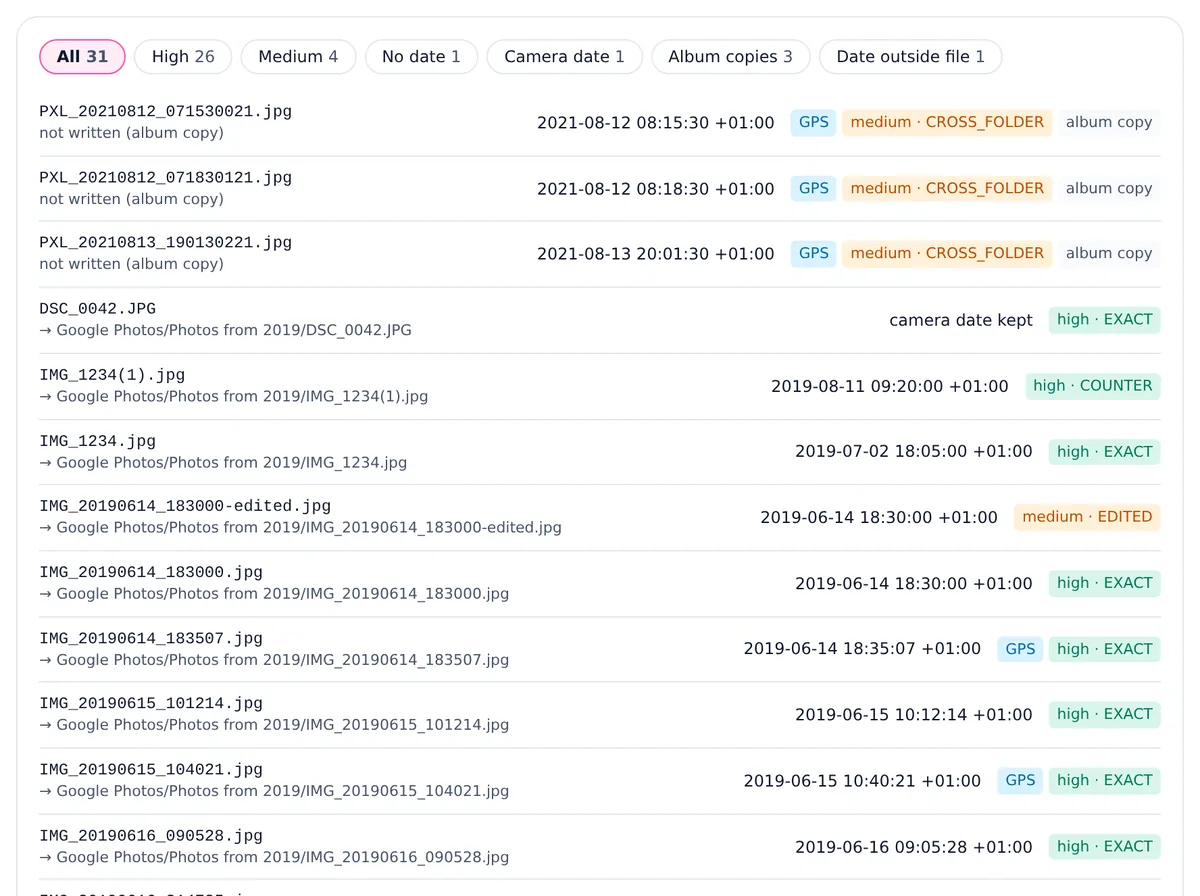
Add every ZIP part to the Google Takeout Fixer and wait for the report. Set the time zone the photos were taken in; Immich shows the wall-clock time and offset that are written.
- 2
Decide on albums before writing
If you want Immich albums from your Google albums, keep "Keep the Takeout folders" and turn off "Skip album copies", so every album folder is complete. If you only want the timeline, leave album copies skipped: each photo is then uploaded once.
- 3
Write to a folder
For Immich, a folder output is the simplest: choose a folder on this computer in Chrome or Edge. If you take the ZIP, extract it before uploading. The scripts in the folder only change file dates; the upload works without running them.
- 4
Upload with the Immich CLI
Log in with your server URL and API key, then upload the folder recursively. With --album, the CLI creates an album from each folder name, as described in the Immich CLI documentation. The web uploader also works for smaller batches, without albums.
- 5
Check the timeline and clean up the year albums
Open the timeline and spot-check a few years and the map. With --album, the year folders also become albums such as "Photos from 2019"; delete those in Immich if you do not want them. Deleting an album does not delete its photos.
Steps and menu names were checked against Google, Apple and Immich documentation on that date. Omnvert is not affiliated with Google, Meta or Microsoft; product names are used only to describe compatibility.
Start here: write your Takeout dates into the files before uploading to Immich. The scan and preview are free, and 25 files per job are written for free, enough to test one upload.
npm i -g @immich/cli
immich login https://photos.example.com/api YOUR_API_KEY
immich upload --recursive --album "Google Photos fixed"Replace the address (it ends in /api) and the key with yours, and the folder name with your output folder. Leave out --album if you do not want albums from folder names.
Test with 25 files first
The free plan writes 25 files per job, which makes a good test batch. Upload them with --album-name "Takeout test" so they land in one album you can find again. Open a few in Immich and check the date, the time with its offset and the map in the info panel. If the time is off by whole hours, the time zone was wrong: change it in the tool and write again. Then delete the test assets in Immich, empty the trash and run the full upload. Deleting first matters, because a re-written file is a different file and Immich would keep both.
Why Immich needs the dates inside the files
Immich takes the date taken from the metadata in each file, or from an XMP file next to it; its sidecar documentation lists the date fields it reads, starting with DateTimeOriginal. It does not read Google's .json sidecars: when a user asked for that, the Immich team pointed to immich-go. A Takeout uploaded as it is therefore shows screenshots, saved images and scans on the upload day, without the location Google added. The Immich FAQ also notes that Immich does not modify your original files, so dates have to be right before they arrive.
Albums
Takeout stores each Google album as a folder that repeats the album's photos. If you upload the year folders and the album folders, the CLI sees the same photo twice. The CLI documentation says Immich always deduplicates by hashing, so an identical copy is not stored a second time; check one album after the upload to see that it holds the photos you expect. In short: keep album copies (turn off the skip option) when you want albums, use --album, and remove the year-folder albums afterwards. What is inside a Google Photos Takeout shows how album folders are laid out.
A note for command-line importers: immich-go
immich-go is a community tool that the Immich documentation recommends for Takeout. Its upload from-google-photos command reads the Takeout ZIPs and their JSON itself and creates albums, so if you are comfortable in a terminal you may not need to fix the files first. The difference is where the dates end up: immich-go hands Google's data to Immich during the upload, while the Takeout Fixer writes it into the files, so any app that reads the files later, a backup, another photo manager or a future Immich reinstall, sees the same dates. Some people do both: fix the files for the archive, then upload the fixed folder.
For background on the matching rules both tools deal with, see why some Takeout photos do not match their JSON, and for the time zone and checking steps, how to fix Google Takeout photo dates.
Honest limits of this version
- JPEG photos and MP4 or MOV videos get the date written inside the file. JPEGs also get the location and, if you ask for it, the caption. Videos get the date only.
- HEIC, PNG and WebP files are copied unchanged. Their date goes into the file date of the ZIP entry and into the set-dates scripts of a folder output, not inside the file. The report marks them as "date outside file".
- GIF, BMP and RAW files never get a date written inside them.
- A date the camera already wrote is kept, unless you turn on "Replace dates the camera already wrote with Google's date".
- A year in a folder name, such as "Photos from 2019", is never written as a date. Google files late uploads and scans under the upload year, so the folder is not proof of when a photo was taken.
Frequently asked questions
Can I use an Immich external library instead of uploading?
Yes. Put the fixed folder where the server can read it and add it as an external library. Immich reads the dates from the files the same way. Albums are not created from folders in that case.
Should I upload the edited copies?
That is your choice. Files ending in -edited get the original's date and are marked as medium matches. If you want only one version, delete the edited or the original copy in the output folder before uploading.
Will Immich show the location on its map?
For JPEGs, yes: the tool writes the GPS position from Google's JSON when the photo has none. Videos and HEIC, PNG or WebP files keep only the location they already had.
I already uploaded the raw Takeout. What now?
Delete those assets in Immich (and empty the trash), then upload the fixed folder. Otherwise the fixed files differ from the uploaded ones and both copies stay.
Does the tool need access to my Immich server?
No. It runs in your browser on your computer and never talks to Immich. You upload the result yourself.