Images & conversion6 min read
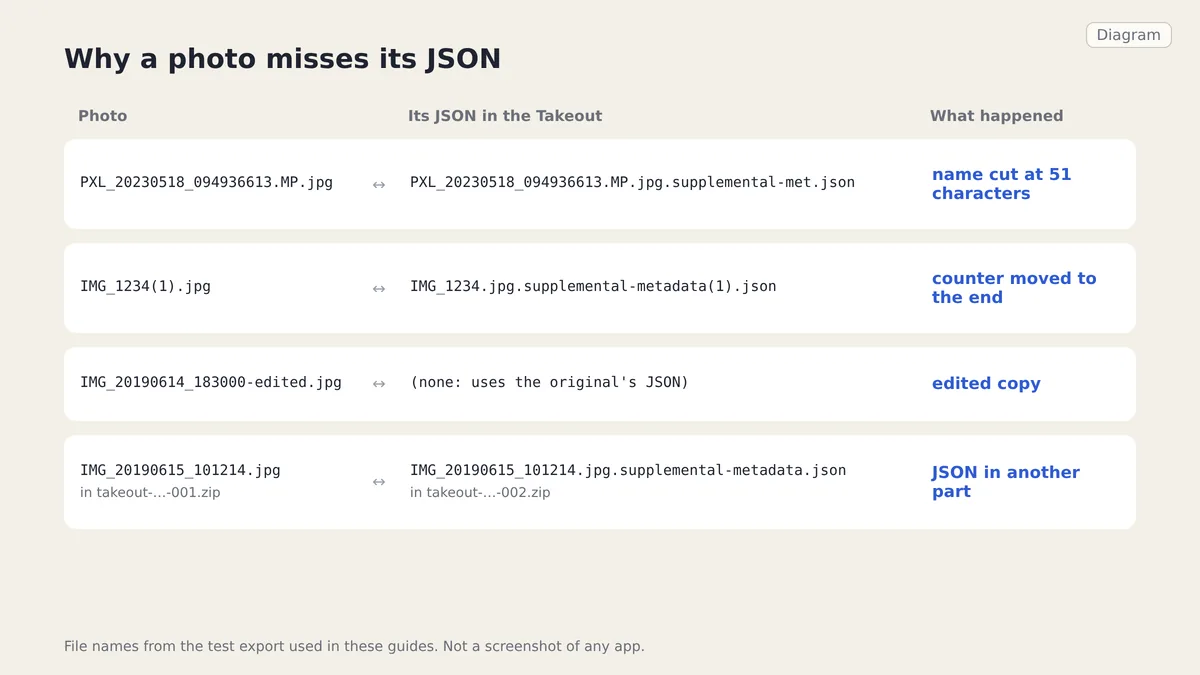
Why some Takeout photos do not match their JSON
Truncated supplemental-metadata names, moved (1) counters, edited copies and JSON in another ZIP part: why Takeout photos lose their JSON and how to match them.
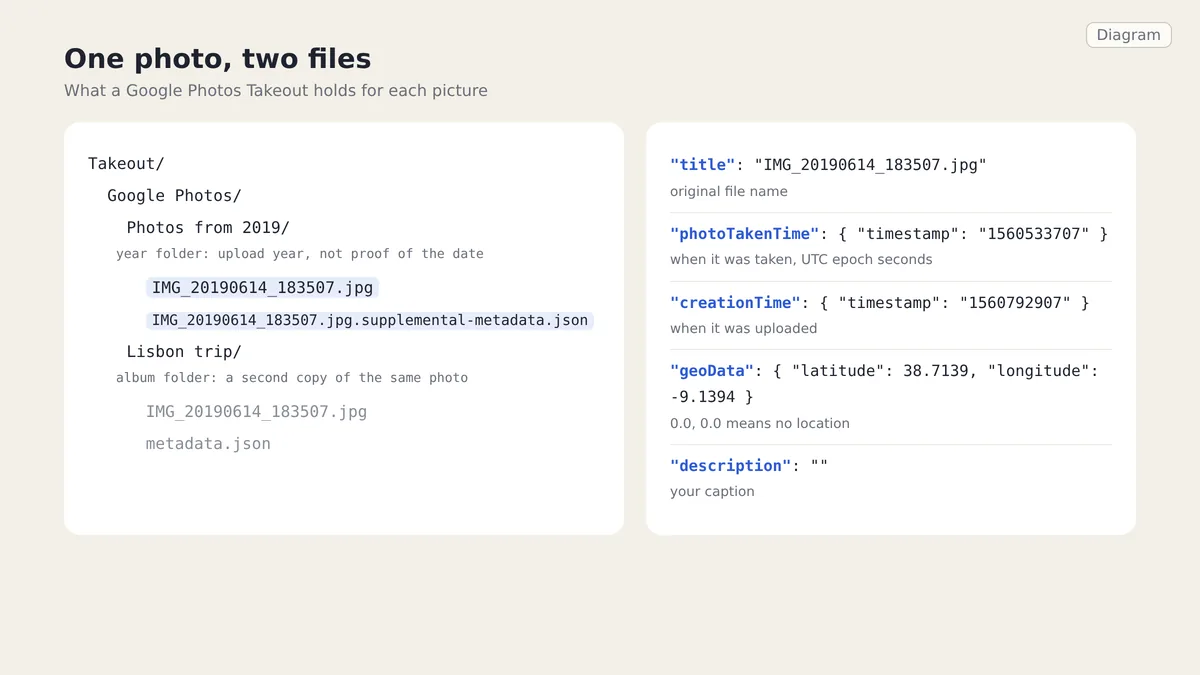
A Google Photos Takeout holds your photos in year and album folders, with a JSON file for each photo that carries the date taken, location and caption. Photo apps read the date inside the image and ignore that JSON, which is why many Takeout photos land on the download day.
Checked on 1 October 2026 against a two-part test export and Google's help page on downloading your data. Omnvert is not affiliated with Google, Meta or Microsoft; product names appear here only to describe compatibility.
A Google Photos Takeout is a set of ZIP files that hold your photos and videos in year folders and album folders, plus one JSON file per photo. That JSON, called a sidecar, carries what Google knows about the picture: the original file name, the moment it was taken, where, and your caption. Dates go missing because photo apps read the date inside the image file and ignore the JSON next to it. To put the JSON data back where apps look for it, use the Google Takeout Fixer to write the dates into your photos. The rest of this article walks through the export so you know what you are looking at.
Every part starts with a folder called Takeout. Inside it, Google Photos content sits in a folder named in the language of your account: Google Photos for English, Google Fotoğraflar for Turkish, Google Fotos in several other languages. Tools that look for the English name break on those exports. Below that you find two kinds of folders:
Photos from 2019. Normally every photo and video in your library appears in one of them. The year is not a reliable date: scans of old prints and photos uploaded long after they were taken can sit under a year that is not the year they were taken.Lisbon trip. They repeat the photos of that album, so the same picture is in the export twice. Each album folder also has a metadata.json that describes the album itself (title, date, sharing), not a photo.A large library is split into several archives, numbered -001, -002 and so on. The split follows size, not folders: one year folder can be spread over two parts, and a photo can sit in one part while its JSON sits in the next. Google lets each archive be downloaded five times within about seven days, so download every part before you start. Our guide to downloading Google Takeout the right way covers sizes and missing parts.
Each photo has one sidecar in the same folder. In older exports it is named after the photo plus .json, for example IMG_20190614_183507.jpg.json. Recent exports use IMG_20190614_183507.jpg.supplemental-metadata.json. Long names are cut short, and photos with a counter such as (1) get the counter in a different place; the companion article on why some Takeout photos do not match their JSON goes through every variant. This is the sidecar of one photo from our test export:
{
  "title": "IMG_20190614_183507.jpg",
  "description": "",
  "imageViews": "4",
  "creationTime": {
    "timestamp": "1560792907",
    "formatted": "Jun 17, 2019, 5:35:07 PM UTC"
  },
  "photoTakenTime": {
    "timestamp": "1560533707",
    "formatted": "Jun 14, 2019, 5:35:07 PM UTC"
  },
  "geoData": {
    "latitude": 38.7139, "longitude": -9.1394, "altitude": 0.0,
    "latitudeSpan": 0.0, "longitudeSpan": 0.0
  },
  "geoDataExif": {
    "latitude": 38.7139, "longitude": -9.1394, "altitude": 0.0,
    "latitudeSpan": 0.0, "longitudeSpan": 0.0
  },
  "url": "https://photos.google.com/photo/…",
  "googlePhotosOrigin": { "mobileUpload": { "deviceType": "ANDROID_PHONE" } }
}timestamp is a string of seconds since 1 January 1970 in UTC, so "1560533707" means 14 June 2019, 17:35:07 UTC. That is 18:35:07 in London that summer and 20:35:07 in Istanbul. The UTC moment is exact; the time zone is not stored, so you choose it when you write the date into the file. The formatted text next to it is for people, follows the account language, and should not be parsed.0.0 for both latitude and longitude means no location, not a point in the Gulf of Guinea.The other fields, such as view counts, the photo's URL and the upload origin, do not belong in the image file. Open-source helpers read the same core fields; the date code of Google Photos Takeout Helper, for example, reads photoTakenTime as epoch seconds.
Many photos carry their own capture date inside the file, written by the camera. Those sort correctly wherever you import them, and Takeout does not change that. The trouble is the rest:
Apple Photos, Immich and most other photo managers read the date inside the file and do not read Google's JSON. Immich's maintainers, asked to support the sidecars, pointed users to a separate import tool instead. The answer is to copy the JSON data into the files once, before importing anywhere.
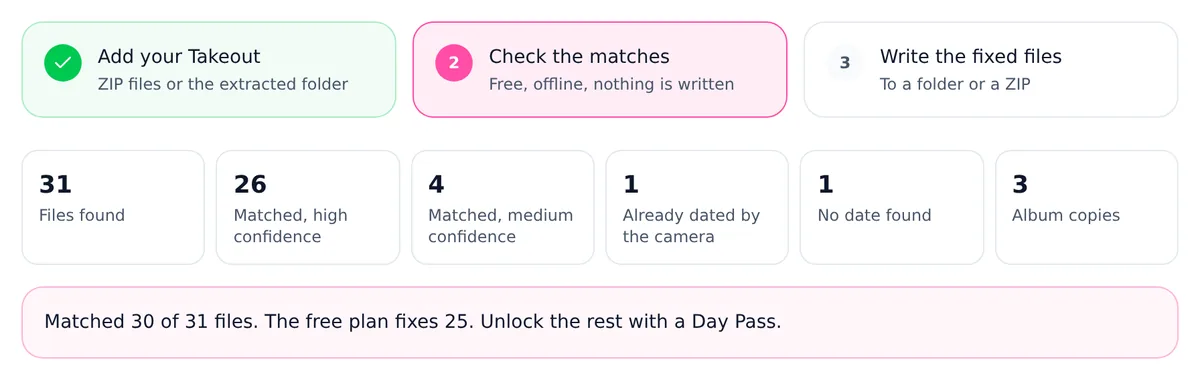
Because album folders repeat their photos, a naive import doubles every album photo. The copies are byte-for-byte identical to the year-folder originals, and the ZIP directory already lists each file's size and checksum, so the Takeout Fixer spots them without opening the files and counts them on its own card. By default it skips them, which gives each photo once. If you want your albums back in the new app, turn the option off and import the album folders as albums; the Apple Photos guide and the Immich guide show how.
Names in the export follow the account language. The top folder is translated, edited copies get a suffix in that language (-edited in English, -bearbeitet in German, -modifié in French), and year folders read Photos from 2019 in English exports and can be translated in others. A script that searches for Google Photos/Photos from misses all of that. The Takeout Fixer does not rely on folder names: a file is a photo or video by its extension, and the export is recognised as a Google Photos Takeout because its media files have sidecars.
Keep the ZIPs as they are and add all parts at once, so a photo can meet its JSON in another part. The Google Takeout Fixer scans them in your browser, shows how each photo was matched, and writes the date, the location and, if you choose, the caption into the files. The step-by-step version, including how to check the result, is in how to fix Google Takeout photo dates. Scanning and previewing are free and the first 25 files of each job are written for free; the existing plans cover the rest.
Know the limits of this version. JPEG photos and MP4 or MOV videos get the date written inside; JPEGs also get the location and the caption. HEIC, PNG and WebP files are copied unchanged, with the date in the ZIP entry time and in the set-dates scripts of a folder output. GIF, BMP and RAW files never get a date inside. A date the camera already wrote is kept unless you choose to overwrite it, and a folder year alone is never written. If you share some of the fixed photos later, remember that they now carry a location again; the EXIF Remover takes it out.
They are sidecars: one per photo or video, holding the original file name, the time it was taken (photoTakenTime), the upload time, the location and the caption. Album folders also contain a metadata.json that describes the album, not a photo.
Not before the dates are written into the photos. For many files the JSON is the only place the real date and location are stored. After a fix, the photos no longer need them, but keeping the original ZIPs as a backup costs only disk space.
UTC. The timestamp is seconds since 1 January 1970 UTC. The local time depends on where the photo was taken, which the JSON does not say, so you pick the zone when writing the date.
Takeout puts every photo in a year folder and repeats album photos in each album folder. The copies are identical files. Skip them for a clean library, or keep them to rebuild albums.
No location. Google writes zeros when it has none, so a fixer must not turn them into a GPS position off the coast of Africa.
Truncated supplemental-metadata names, moved (1) counters, edited copies and JSON in another ZIP part: why Takeout photos lose their JSON and how to match them.
The location, timestamps, serial numbers and embedded thumbnail inside a photo, what platforms really strip, and how to verify a file is actually clean.
What a quality setting really controls, what chroma subsampling throws away, which SSIMULACRA 2 scores map to which settings, and why re-encoding hurts.