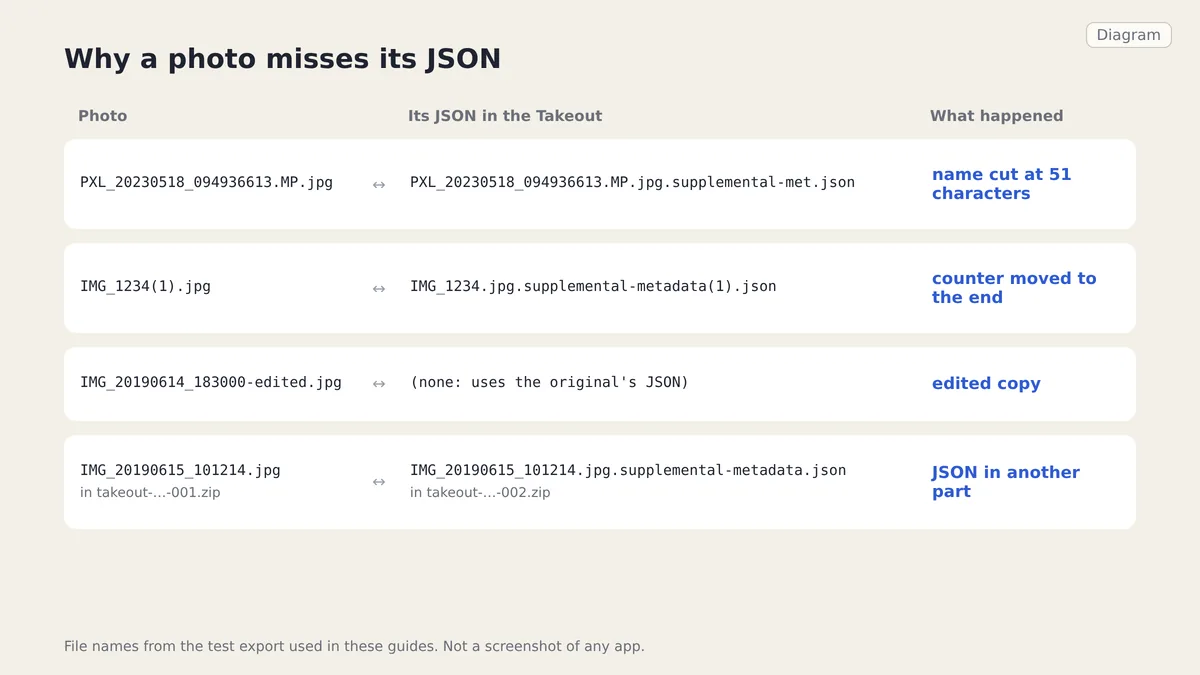
Google names each Takeout JSON after the photo's original name, then cuts it at 51 characters, moves (1) counters to the end, skips edited copies and may store it in another ZIP part. Matching by photo name plus .json misses all of these.
Checked on 1 October 2026 against a two-part test export and the matching code of Google Photos Takeout Helper, an open-source tool that documents the same rules. Omnvert is not affiliated with Google, Meta or Microsoft.
Some Takeout photos do not match their JSON because Google names each JSON after the photo's original file name and then bends that name: it cuts long names to 51 characters, so .supplemental-metadata.json turns into .supplemental-met.json; it puts the (1) counter of duplicate names in a different place; it gives edited copies no JSON at all; and it can put the JSON in a different ZIP part than the photo. A script that looks for photo name + .json misses all four. The Google Takeout Fixer matches photos to their JSON with a fixed ladder of rules, shown below with an example from our test export for each case.
Four ways a photo and its JSON drift apart. Diagram drawn from the file names of our test export.
How the matching works
All parts are read together first, so every JSON in every ZIP is known before matching starts. Each photo then walks the same ladder: exact name, moved counter, truncated name, the title field inside the JSON, live photo partner, edited copy, and finally the original name in another folder. The first step that finds exactly one JSON wins. A step that finds two or more candidates never picks one; it notes the conflict and the next, weaker step is tried. Album metadata.json files are recognised and ignored, because they describe an album, not a photo.
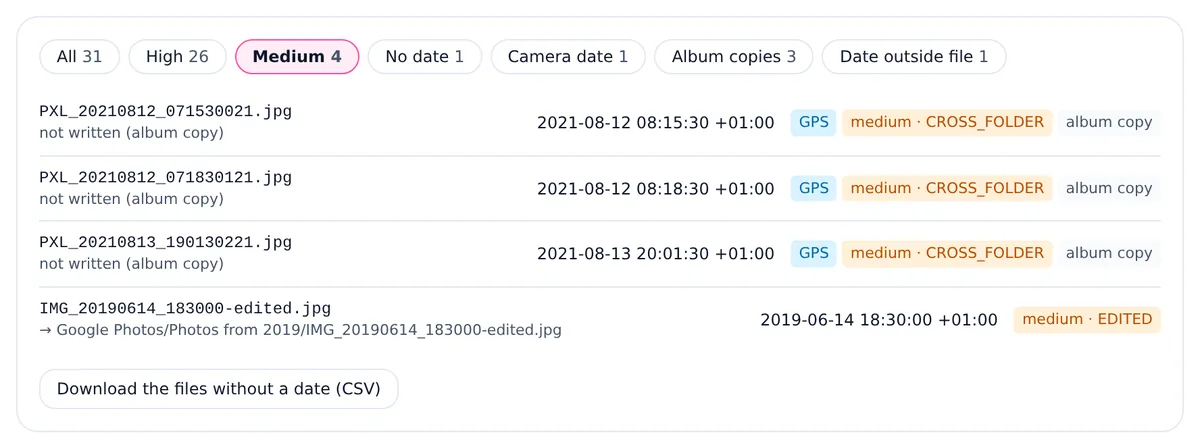
Every match gets a confidence. High means the JSON was found by name or by its title in the same folder. Medium means a weaker rule was needed, or an earlier step saw a conflict. The preview shows the rule next to each file, so you can check the medium ones before anything is written.
1. Truncated names
Google caps the JSON file name at 51 characters, and .json survives the cut. With the newer .supplemental-metadata suffix, even an ordinary phone name is too long:
The rule is visible in the source of Google Photos Takeout Helper, which shortens a name when name + .json is longer than 51 characters. Whether Google counts characters or bytes for names with Turkish letters or emoji is not documented, so the Takeout Fixer accepts a small window of cut lengths, and only when the shortened name is a true prefix of the expected one, the JSON is in the same folder, its title does not contradict the photo, and exactly one JSON fits. If two photos would claim the same cut JSON, both are marked medium so you can look at them. When the photo's own name was cut too, the full original name in the JSON's title is used to find the pair.
2. Moved counters
When two uploads share a name, Google adds a counter to the second photo, but on the JSON the counter goes at the end, after the extension:
A naive match pairs IMG_1234(1).jpg with the JSON of IMG_1234.jpg and gives two different photos the same date. In our test export the two were taken about six weeks apart. The fixer splits the counter off the photo name and looks for the JSON with the same counter at the end, in both the old and the new naming. That is a high-confidence match. The Takeout Helper source calls this the bracket swap and notes that quite a lot of files have it.
3. Edited copies
If you edited a photo in Google Photos, Takeout exports the original and an edited copy with a suffix, and only the original has a JSON:
IMG_20190614_183000.jpg
IMG_20190614_183000.jpg.supplemental-metadata.json
IMG_20190614_183000-edited.jpg            (no JSON of its own)
The suffix follows the account language: -edited in English, -bearbeitet in German, -modifié in French, -modificato in Italian, -bewerkt in Dutch, -edytowane in Polish and -編集済み in Japanese, among others. The fixer strips a known suffix, finds the original's JSON with the same ladder, and gives the edited copy the same date and location. It is marked medium with the reason "edited copy; used the original photo's sidecar". An edit saved in a different format, such as a JPG edit of a HEIC original, is matched the same way. Translations we have not yet seen in a real export are on the list too, but they only ever produce medium matches.
The Medium filter in the preview of our test export: three album copies and one edited copy.
4. JSON in another archive
Takeout splits by size, so a photo can land at the end of -001.zip while its JSON starts -002.zip. In our test export, two of the June 2019 photos have their JSON in the second part. Fix the parts one at a time and those photos come out undated. Because the fixer indexes all parts together, the folder path is the same in both ZIPs and the match is an ordinary exact one. Google's download help explains that a large export is split into several archives; our Takeout download guide shows how to spot a missing part, and the fixer warns when the numbering has a gap or many JSON files have no photo.
If the parts were extracted into separate folders, such as Takeout and Takeout 2, the folder paths no longer agree. The last rung of the ladder then looks for a JSON whose title is the photo's name anywhere in the export, and accepts it only if there is exactly one. Such matches are medium. Album copies are matched the same way, which is why they appear in the Medium filter above.
Live and motion photos
A Live Photo from an iPhone arrives as a still and a short video with the same name and different extensions, and a Pixel or Samsung motion photo can bring a separate video part. They share one JSON. The fixer finds the partner in the same folder and uses its sidecar for both, at high confidence, so the still and the video get the same date.
When nothing matches
If no rule finds exactly one JSON, the fixer does not guess. It then tries the file name: many cameras put the date and time in it, such as IMG_20190614_183000.jpg, read as local time in the zone you choose, while Pixel PXL_ names are in UTC. Those dates are marked low. A file with no usable name, like image(3).jpg in our test export, is copied unchanged and listed under "No date found". The year of a folder such as Photos from 2019 is reported but never written, because it is not proof of when a photo was taken. Download the CSV of undated files from the preview to see what is left.
What gets written also depends on the format in this version. JPEG photos and MP4 or MOV videos get the date inside; JPEGs also get the location and, if you ask, the caption. HEIC, PNG and WebP are copied unchanged with the date in the ZIP entry time and the set-dates scripts. GIF, BMP and RAW files never get a date inside. A camera date already in the file is kept unless you choose to overwrite it.
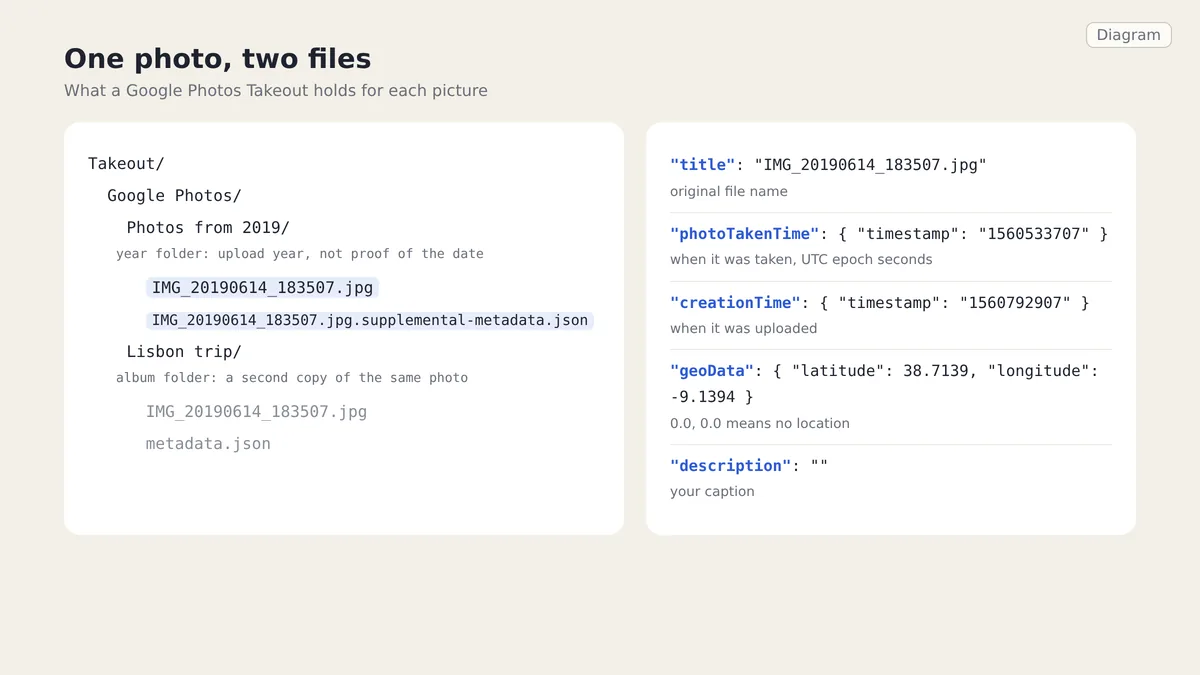
It is the JSON sidecar of one photo or video in a recent Google Photos Takeout. It holds the original file name, the time the photo was taken, the upload time, the location and the caption. Older exports named the same file photo.jpg.json.
Why does my JSON end in supplemental-met.json?
Google cuts JSON file names at 51 characters and keeps .json, so a long photo name pushes the end of supplemental-metadata off. The JSON is complete; only its name is shortened.
Why does IMG_1234(1).jpg have the wrong date?
Its JSON is named IMG_1234.jpg.supplemental-metadata(1).json or IMG_1234.jpg(1).json, with the counter at the end. A tool that ignores that swap gives it the date of IMG_1234.jpg.
Do edited copies have their own JSON?
No. Files such as IMG_1234-edited.jpg share the original's JSON. A fixer has to strip the suffix, which changes with the account language, to find it.
What if a photo's JSON is in another ZIP?
Add all parts at once. When they are indexed together the folder paths line up and the JSON is found as if it were in the same archive.
Year folders, album copies and one JSON sidecar per photo: what Google Photos Takeout contains, which fields hold the date, and why photo apps ignore them.
The location, timestamps, serial numbers and embedded thumbnail inside a photo, what platforms really strip, and how to verify a file is actually clean.
What a quality setting really controls, what chroma subsampling throws away, which SSIMULACRA 2 scores map to which settings, and why re-encoding hurts.