3D printing & STL5 min read
Slicer errors explained: what STL warnings mean and how to fix them
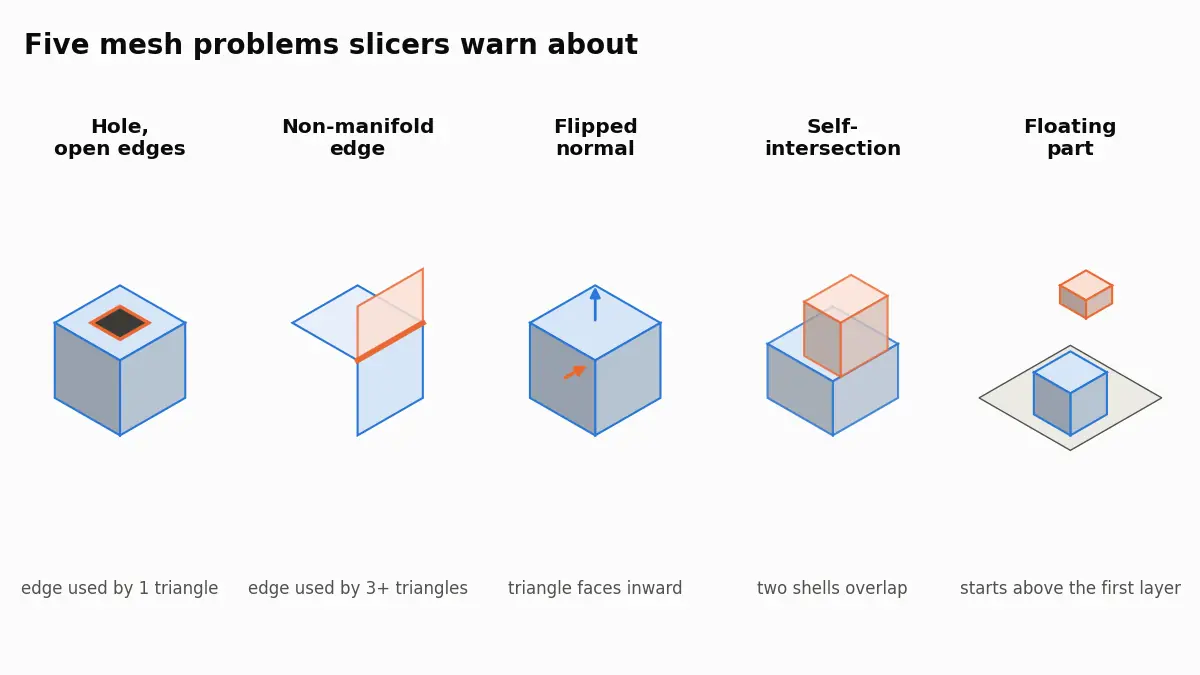
What PrusaSlicer, Bambu Studio and Cura mean by open edges, non-manifold edges, reversed faces and floating parts, and how to repair the STL behind them.
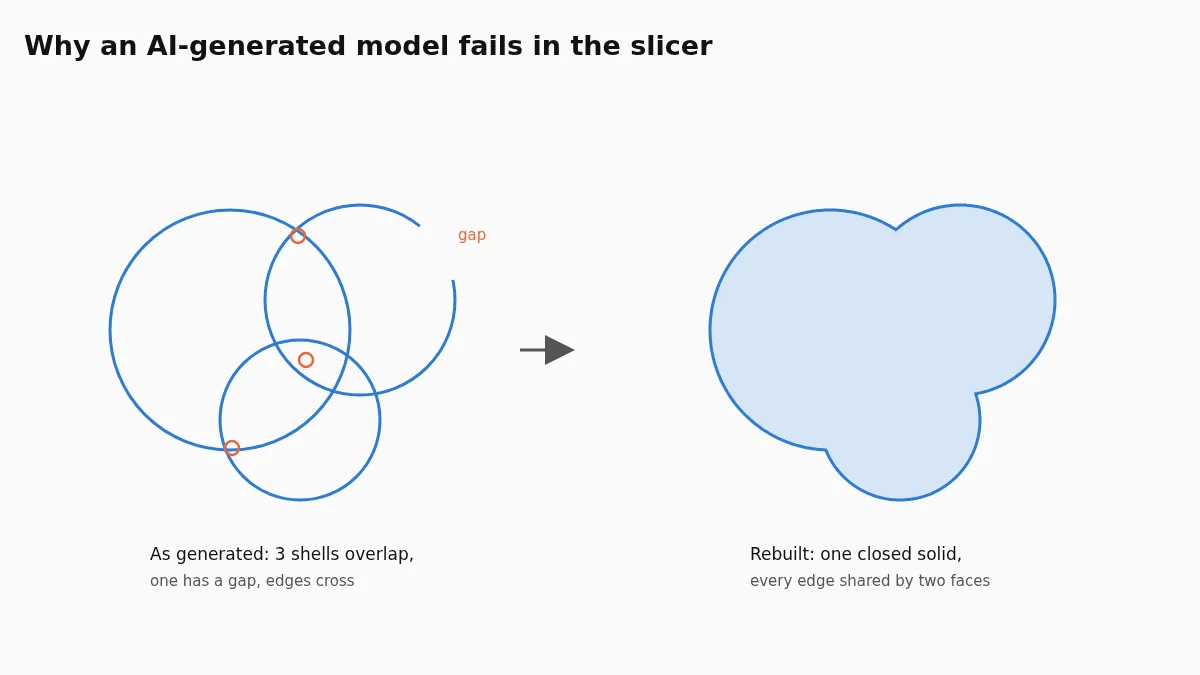
Generated models are surfaces that look right, not solids: parts overlap, holes stay open, faces point inward. Rebuilding the surface around the inside turns them into one closed shell that every slicer reads.
Meshy's documentation was checked on 7 November 2026. The before-and-after numbers come from our own test files, described in the text.
A model from Meshy, Tripo, Rodin or Hunyuan3D often fails in the slicer because it is a surface that looks right, not a solid: parts overlap and pass through each other, a few triangles are missing, some face inward. A slicer needs one closed surface in which every edge joins exactly two faces. You can fix that with the generator's own repair, with a mesh editor, or by uploading the GLB, OBJ or STL to make the AI model printable, which rebuilds it as one watertight shell and shows a before-and-after report.
A slicer cuts the model into horizontal layers and, in every layer, has to decide what is inside the part and what is outside. That decision is only unambiguous for a closed, manifold surface: no gaps, each edge shared by exactly two triangles, all triangles facing outward, and no part of the surface passing through another. Meshy's own printability check looks for exactly these problems: whether the surface is fully closed, non-manifold edges (edges shared by more than two faces), holes and degenerate faces with no area.
When a file breaks those rules, slicers react differently. Some report hundreds of errors and repair what they can, some silently drop a shell, some print a wall that is not there in the model. The error list itself is explained in what slicer STL errors mean.
Image-to-3D and text-to-3D generators are built to produce something that looks right from every side in a viewer. A viewer does not care whether a sword and the hand that holds it are one solid or two shapes stuck through each other, or whether a strand of hair is a closed tube or a single sheet. A printer cares about all of it. The typical problems, in the order we see them most often:
The generator's own repair. Meshy offers a free printability check and a repair that costs 10 credits; for models Meshy generated it needs a paid plan. It is the quickest route if you are already a subscriber.
A mesh editor. Blender's 3D-Print Toolbox, Meshmixer and similar programs can merge overlapping parts with boolean unions and close holes by hand. It works and gives full control, but it takes time per model and a boolean union of dozens of intersecting pieces often fails or leaves new errors.
Rebuilding the surface. Instead of patching triangles, a rebuild works out what is inside the model and wraps a new, closed surface around it. Overlaps disappear because the inside of two overlapping parts is simply one region. That is how our tool works: it decides inside and outside by counting how rays from three directions cross the surface, builds a new surface on a fine grid, and snaps it back onto your original wherever the two match, so the detail is kept.
Export the most detailed version the generator offers, as STL, OBJ or GLB. The rebuild keeps detail down to its grid step and simplifies the result at the end, so starting from a version that was already reduced throws away detail you cannot get back. Textures do not matter for printing; a file without them is smaller and uploads faster.
One catch with GLB: some exporters compress the geometry with Draco or meshopt. Those files look normal in a viewer but need a decoder to read, and our tool asks you to export again without compression, or as OBJ, rather than guess.
To see what happens on a deliberately broken file, we made a test model that has the typical problems: two overlapping spheres, 8 percent of the faces flipped, 40 faces deleted and 30 tiny floating specks, then exported it as a GLB 1.2 units tall, the way a generator would.
| Before | After | |
|---|---|---|
| Watertight | no | yes |
| Shells or parts | 32 | 1 |
| Open edges | 118 | 0 |
| Self-intersections | 429 | 0 |
| Flipped faces fixed | 1,437 | 0 left |
The volume of the result matched the exact union of the two spheres to within half a percent, and the specks were removed. On real scans with overlapping parts the same holds: one closed part comes out, and the average change from the original surface is a few thousandths of a millimetre, because most of the new surface is snapped back onto the old one.
In the report from the tool, check three things: watertight should say yes, the part count should usually be 1, and the volume should fit the size you expect. If the original file had surfaces passing through themselves, the report notes that separately, which tells you the problem came from your file and not from the rebuild.
Because it is not one closed solid. Parts overlap and cross, some edges are open and some faces point inward. A slicer needs every edge to join exactly two faces to know what is inside the part.
Some can. Meshy has a printability check and a repair that costs 10 credits and needs a paid plan for models it generated. A rebuild tool or a mesh editor are the alternatives.
Detail larger than one grid step is kept, because the new surface is snapped back onto the original. Features thinner than a grid step, such as a very fine sword tip, can thicken.
Generators export in their own units, often metres or centimetres, and STL has no unit field, so slicers read the numbers as millimetres. Set the print height before or after the rebuild.
Not in an STL, which stores only geometry. Keep the original GLB for rendering and print from the rebuilt STL.
What PrusaSlicer, Bambu Studio and Cura mean by open edges, non-manifold edges, reversed faces and floating parts, and how to repair the STL behind them.
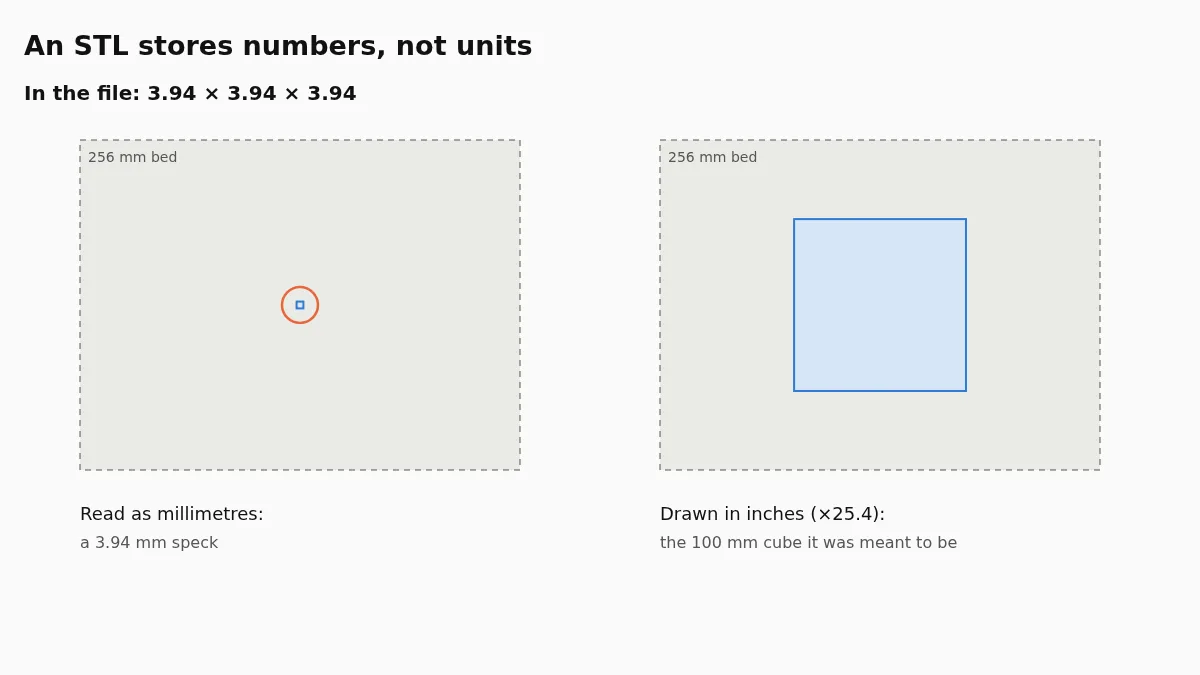
STL has no unit, so slicers read millimetres. How to tell inches from cm or metres, what PrusaSlicer and Cura detect on their own, and how to fix the file.
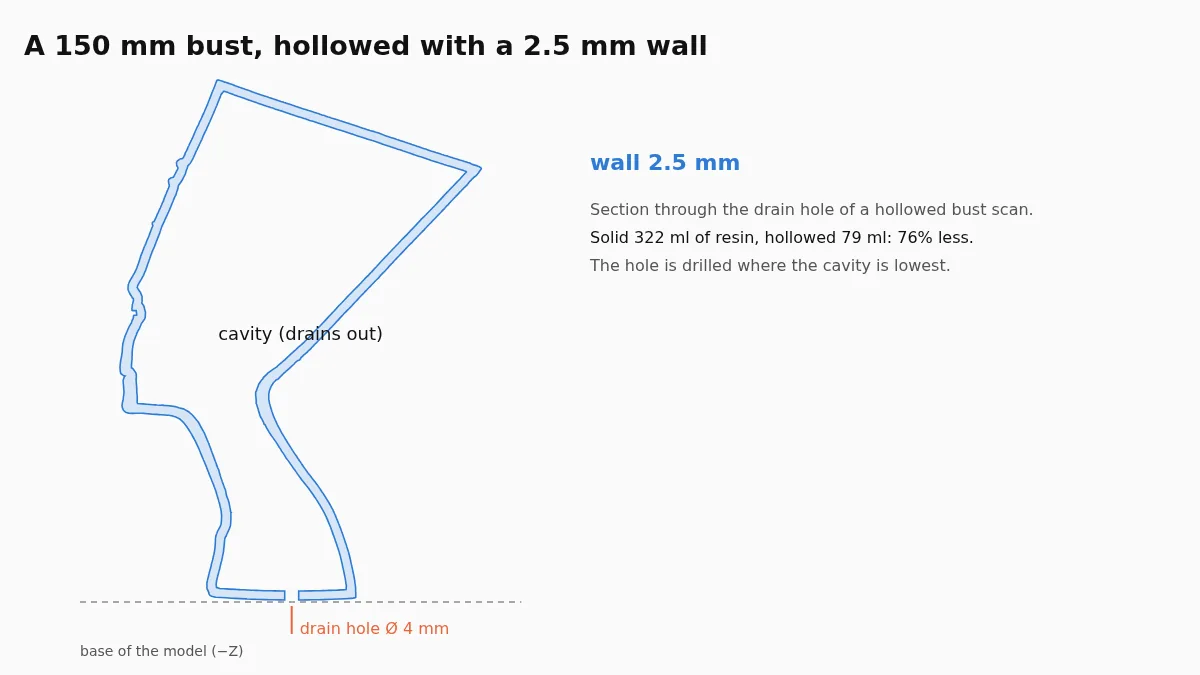
Measured resin savings on seven scans, how thick the wall should be, where the drain holes go and why thin figures save less. With an online hollowing tool.