3D printing & STL6 min read
How to split an STL that is too big for your printer bed
Bed sizes of common printers, how cutting an STL into parts works, margins, orientation and how to join the parts with glue, pins or dovetails.
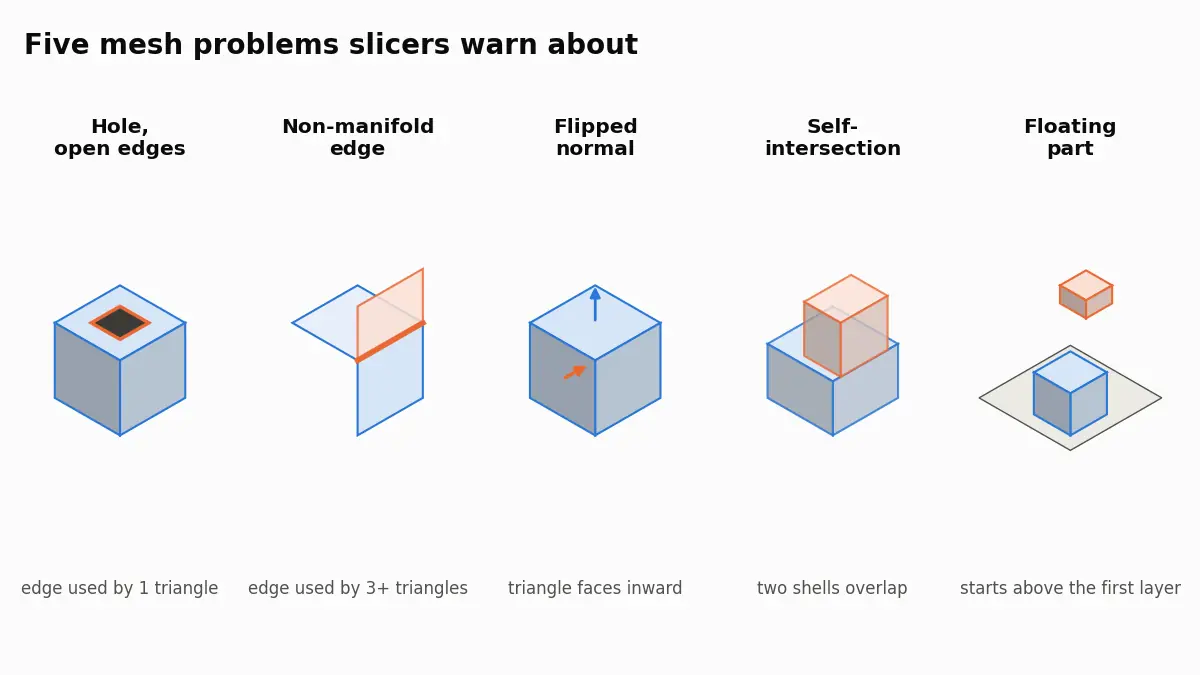
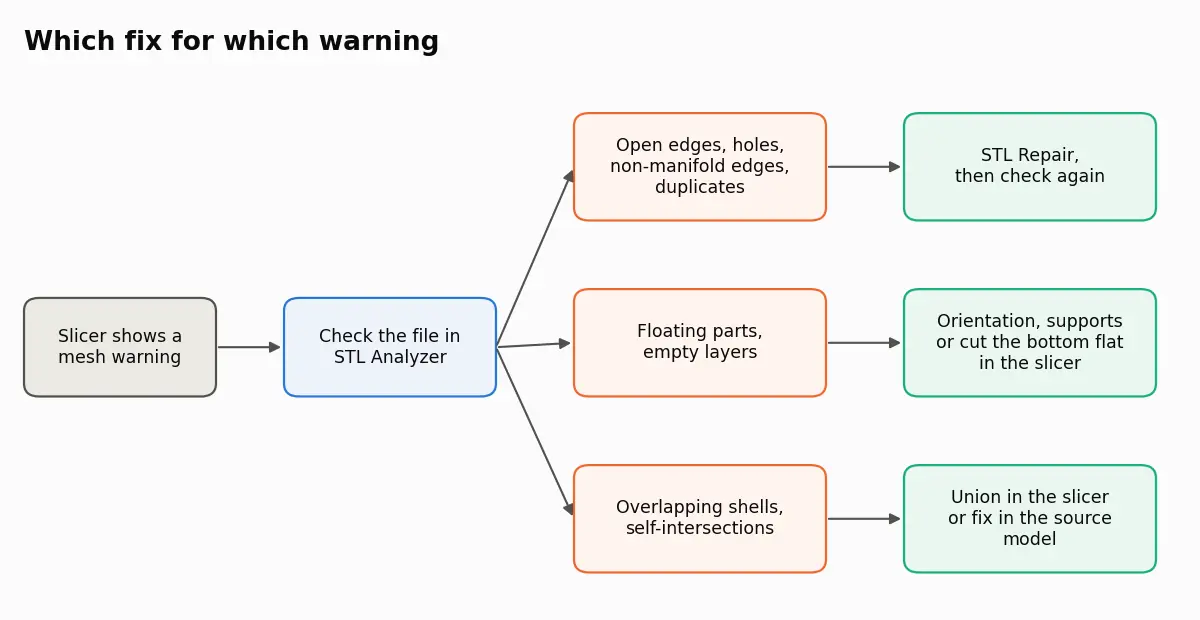
Most slicer warnings say the mesh is not a closed solid: open edges, non-manifold edges, reversed faces or overlapping shells. Those are fixed in the file. Floating parts and empty layers are about orientation and supports instead.
Checked on 1 October 2026. Warning texts are quoted from the slicers' own help pages and, where those paraphrase, from the text files the programs ship with (PrusaSlicer 2.9.6 and the current Bambu Studio source). Wording can change between versions.
Slicer warnings about an STL almost always mean the mesh is not a clean, closed solid: some edges belong to only one triangle (holes, open edges), some to three or more (non-manifold), some triangles face the wrong way (flipped normals), shells overlap (self-intersections), or part of the model starts in mid-air (floating parts, empty layers). The first four are mesh problems you fix in the file; the last is about orientation and supports. To see exactly which one you have, run the file through the STL analyzer, which counts open edges and bodies, then repair the mesh with STL Repair if it needs it.
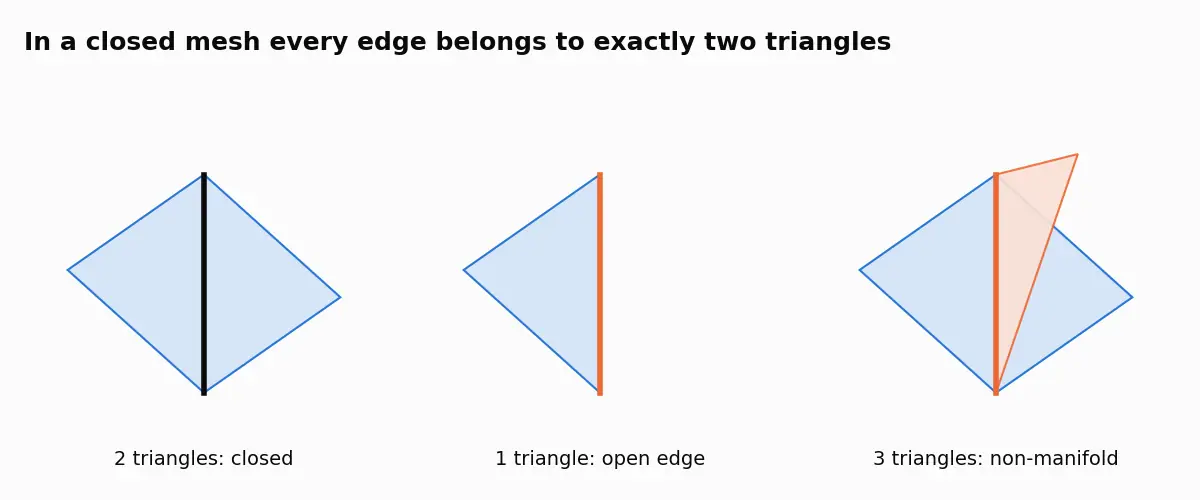
A printable mesh is a closed surface where every edge is shared by exactly two triangles, and every triangle's normal points outward. Slicers need that to decide what is inside the part and what is air. When the rule breaks, the slicer has to guess, and the guess shows up as a missing wall, a filled hole or a layer that disappears.
The wording below is from the English interface; %d stands for a number.
Prusa's knowledge base article on corrupted models explains that PrusaSlicer repairs models automatically to a certain degree and offers a further fix from the warning icon; the exact strings are in the PrusaSlicer translation template. Bambu Lab's Fix Model page says Bambu Studio shows a warning symbol in front of the object name and that its deeper repair uses a Windows service, so it is only available on Windows. Its strings are in the Bambu Studio translation template. UltiMaker's support article on model errors is blunt: Cura cannot fix loaded models for you, and slicing a non-manifold model may lead to unexpected print results.
Typical sources are a missing face in a modelling program, a scan with gaps, or an export that dropped tiny triangles. Small holes are closed by every auto-repair. Large openings, such as a missing base on a scan, need a decision about where the surface should be, which a repair tool can only guess.
Three faces meeting on one edge usually come from two objects that touch along an edge, or an internal wall left inside a model. Repair separates those edges so each belongs to two triangles again.
A triangle facing inward tells the slicer that the inside is outside in that spot. Bambu Studio's message mentions rendering; a whole shell with inverted normals can also be read as a hole rather than a solid. Most repairs reorient triangles to match their neighbours.
Two bodies pushed into each other without being joined are common in downloaded models and exported assemblies. Cura has a Union Overlapping Volumes setting that is on by default, as its mesh fixes article describes. The clean fix is a boolean union in the source model.
Here the mesh can be perfect. A part that starts above the first layer, or a gap between two bodies, leaves layers with nothing to print. Rotate the model, enable supports, or cut the bottom flat in the slicer.
PrusaSlicer can also warn about a "Thin fragile part" or "Low bed adhesion". These are not mesh defects either. Prusa's preferences article describes them as issues in the sliced object that supports or a brim can resolve, such as floating parts, unsupported extrusions and low bed adhesion. Repairing the STL will not make them go away; a brim, supports or a different orientation will.
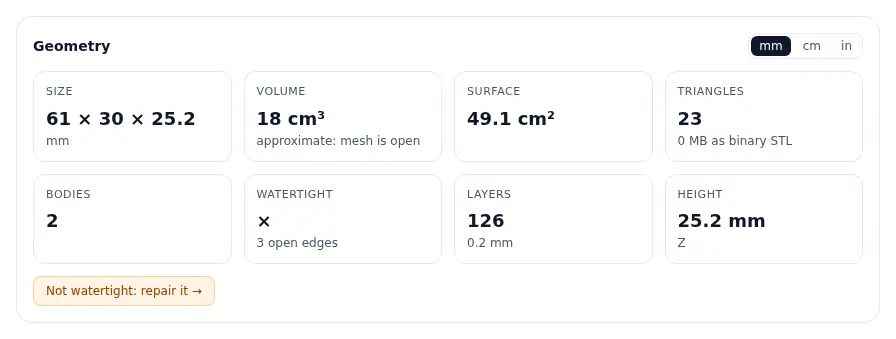
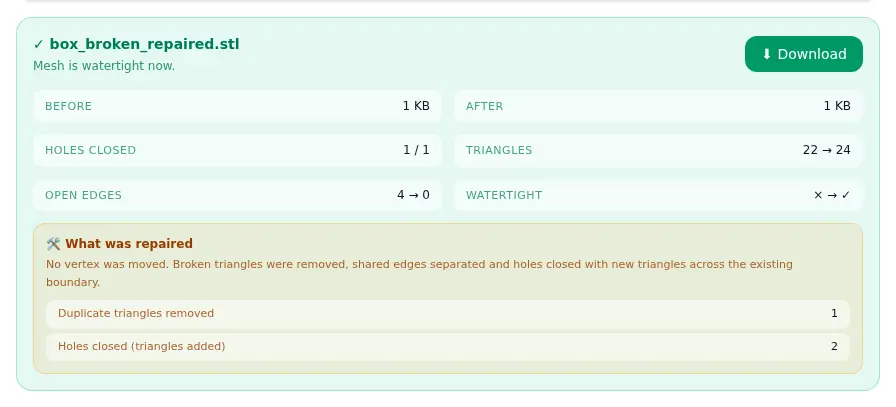
The loose shard is still in the repaired file, because a separate small body is not an error to the mesh; it is something to delete in the slicer. If your slicer flags a mesh problem now, repair the STL online, confirm the result in the STL analyzer and load it again.
Repair closes openings by adding triangles across the existing boundary. That is right for small holes and wrong for a large missing surface, where the result is flat even if the original was curved. It also cannot tell which of two overlapping bodies you meant. If a model fails repeatedly, go back to the source: the non-manifold edges and holes tutorial covers fixing it where it was made. Broken meshes also cause trouble when you split an STL for a smaller bed or reduce its file size, so repair first in both cases.
An edge shared by more than two triangles, or a vertex where surfaces meet in a way a solid cannot have. In a printable mesh every edge belongs to exactly two triangles. Non-manifold edges usually come from objects touching along an edge or internal walls.
Often yes, because slicers auto-repair small holes. The risk is that the slicer guesses wrong and leaves out a wall or fills a hole. If the open-edge count is more than a handful, repair the file first.
Bambu Lab's wiki says its deeper repair uses Microsoft's 3D model repair service, which only exists on Windows. On macOS and Linux, repair the STL before importing it.
UltiMaker's support article says Cura cannot fix loaded models for you. It highlights problem areas, and its Mesh Fixes settings such as Union Overlapping Volumes and Extensive Stitching can work around some problems at slicing time.
The slicer found layers with nothing to print, usually because part of the model starts above the first layer or two bodies have a gap between them. Rotate the model, add supports or cut the bottom flat.
Omnvert's STL Repair does not move any vertex. It removes broken and duplicate triangles, separates non-manifold edges and adds triangles across holes, and the report lists each change.
Bed sizes of common printers, how cutting an STL into parts works, margins, orientation and how to join the parts with glue, pins or dovetails.
Why STL files get large, how to read the triangle count straight from the file size, and what binary, re-export, decimation and 3MF each save in practice.

What each format really stores, how many bytes the same mesh costs in all three, why units decide most arguments, and the edge cases that break silently.