3D printing & STL5 min read
Slicer errors explained: what STL warnings mean and how to fix them
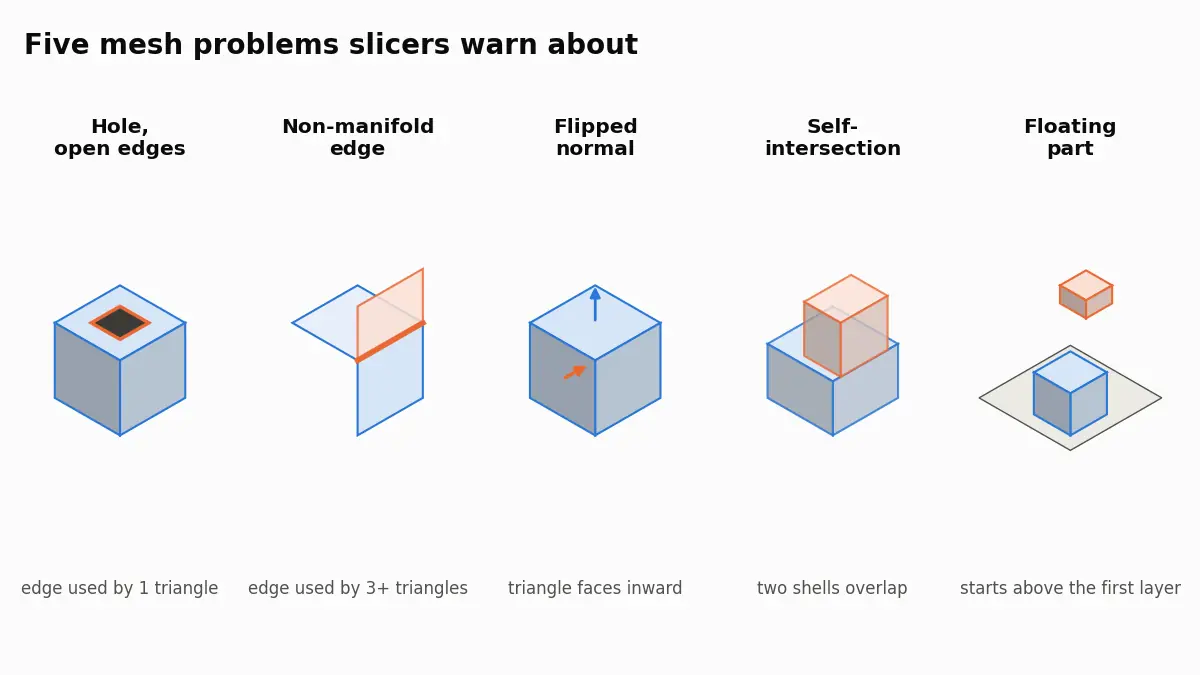
What PrusaSlicer, Bambu Studio and Cura mean by open edges, non-manifold edges, reversed faces and floating parts, and how to repair the STL behind them.
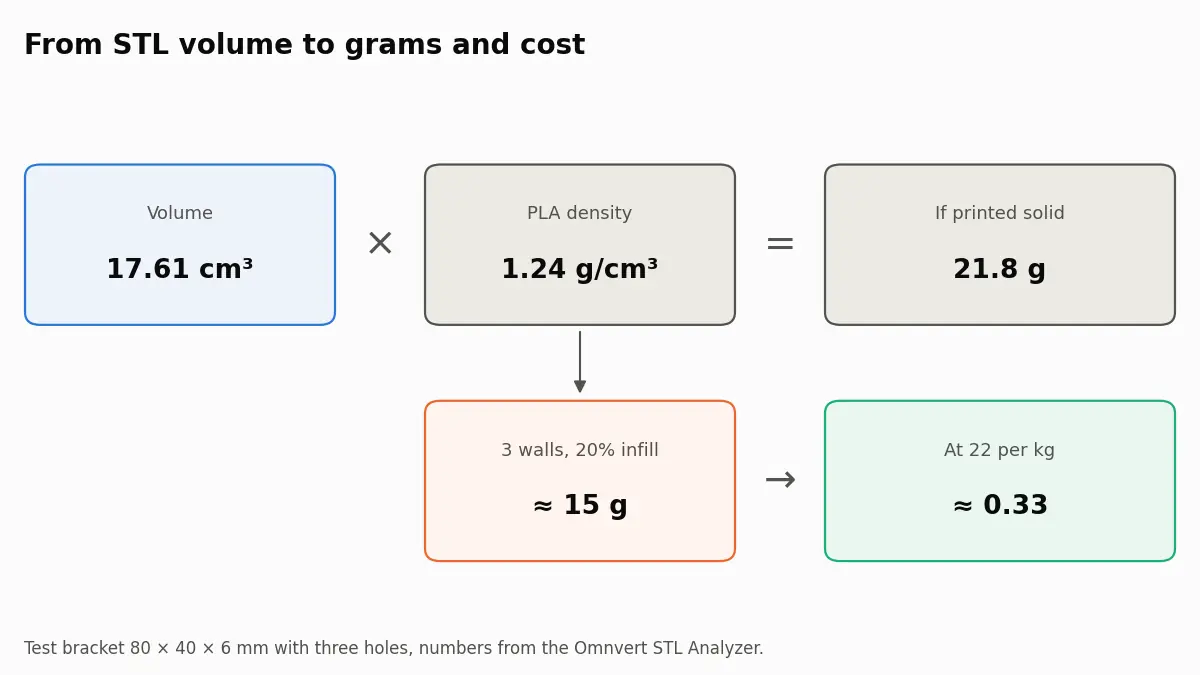
Volume times density gives the weight of a solid print: 17.61 cm³ of PLA at 1.24 g/cm³ is 21.8 g. Walls and infill bring the real figure down, and grams times your price per kilogram gives the material cost.
Densities checked on 1 October 2026 against the manufacturers' technical data sheets, linked in the table. The worked example uses a test part we made and measured ourselves.
To estimate how much filament an STL needs, take its volume in cm³ and multiply by the material's density: PLA is about 1.24 g/cm³, so a 17.61 cm³ part weighs 21.8 g if printed solid. Real prints are not solid, so the weight with walls and infill is lower, and multiplying grams by your price per kilogram gives the material cost. The STL analyzer calculates volume, weight and cost from the file and lets you change material, infill, walls and price to match your printer.
STL stores numbers without units, and slicers read them as millimetres. Before any weight makes sense, confirm the bounding box: a part that should be 80 mm long and shows as 3.1 was drawn in inches, and one that shows as 2,032 was converted to millimetres twice. Since volume grows with the cube of the scale, a unit mistake changes the weight by a factor of 25.4³, about 16,000. The analyzer has a unit switch that reads the same numbers as millimetres, centimetres or inches, and the scaling and thickness tutorial covers fixing it in the model.
Second, check that the mesh is watertight. Volume is only defined for a closed surface; for an open mesh the analyzer still reports a number but marks it as approximate. If it says not watertight, STL Repair closes the holes, and the guide to slicer errors and mesh repair and the non-manifold edges tutorial explain the causes.
| Material | Density (g/cm³) | Data sheet |
|---|---|---|
| PLA | 1.24 | Prusament PLA; Bambu Lab PLA Basic also lists 1.24 |
| PETG | 1.25 to 1.27 | Prusament PETG 1.27; Bambu PETG Basic 1.25 |
| ABS | about 1.04 to 1.05 | Bambu Lab ABS 1.05 |
| ASA | 1.05 to 1.07 | Prusament ASA 1.07; Bambu Lab ASA 1.05 |
| TPU 95A | 1.22 to 1.25 | Bambu TPU 95A HF 1.22; Prusament TPU 95A 1.25 |
The spread between brands is about 2%, smaller than the uncertainty in any infill estimate, so the value printed on your spool or in its data sheet is good enough. The analyzer uses 1.24 for PLA, 1.27 for PETG and 1.04 for ABS by default.
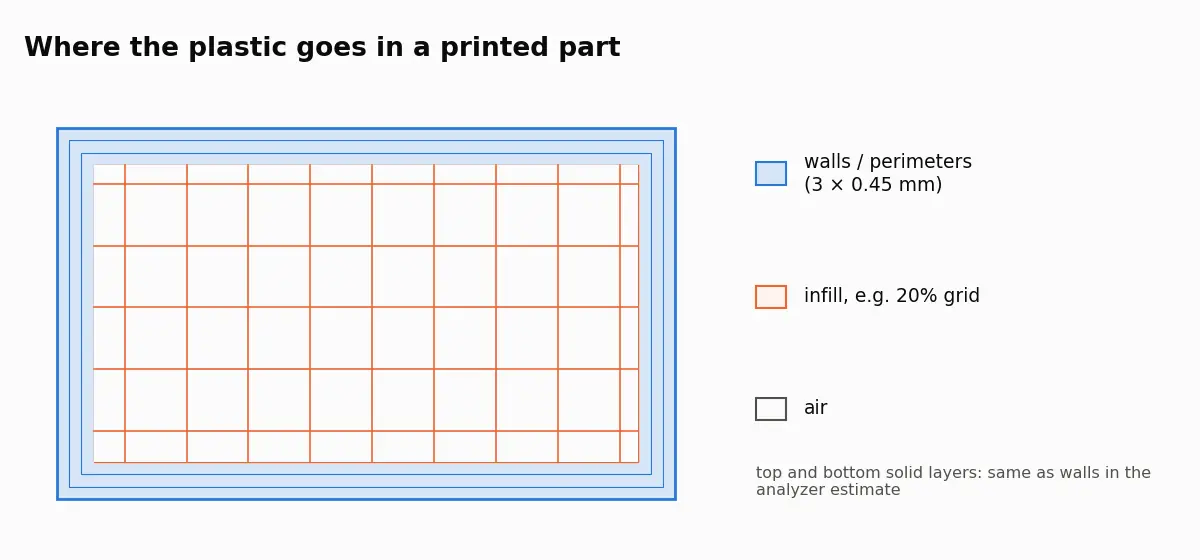
A slicer prints a shell of solid perimeters plus solid top and bottom layers, then fills the inside with a sparse pattern. The analyzer uses a plain model of that: walls of 0.45 mm per perimeter over the whole surface, and the chosen infill percentage for what is left inside.
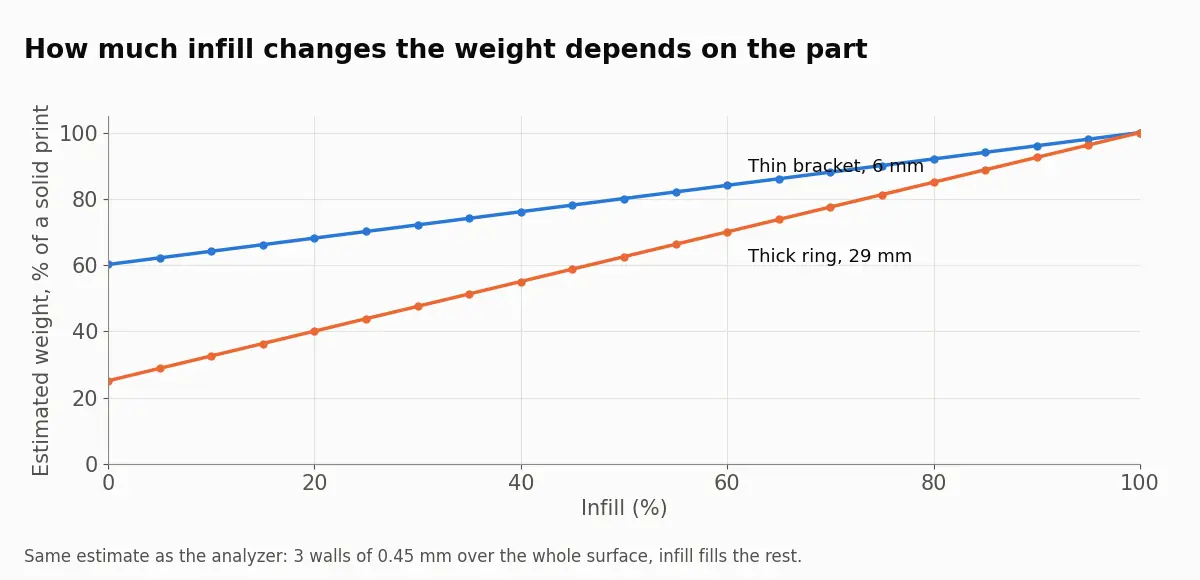
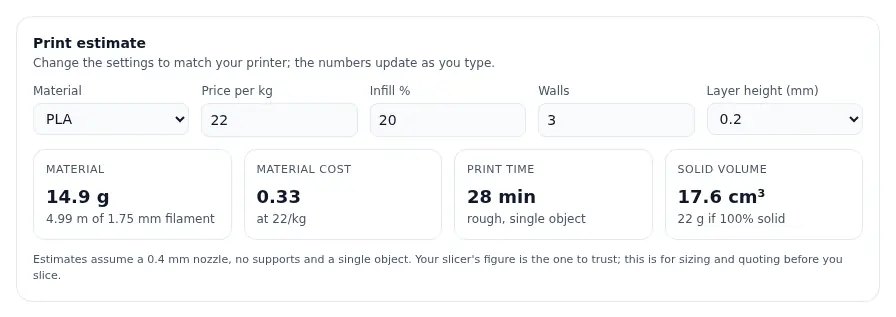
How much infill changes the weight depends on the shape. Our 6 mm thick bracket is mostly wall, so at 20% infill it still weighs 68% of the solid part. A 29 mm thick ring we tested comes in at about 40% of solid at the same setting.
To run the same numbers on your own file, open the STL analyzer and set the material and price you actually use.
Material cost is grams divided by 1,000, times the price per kilogram. At 22 per kilogram, 14.9 g costs 0.33. Filament length follows from the same numbers: 14.9 g of PLA is 12.0 cm³, and a 1.75 mm filament has a cross-section of 2.41 mm², which gives about 5 metres. Material is only part of a quote; electricity, machine time, failed prints and post-processing are separate and are not in this estimate.
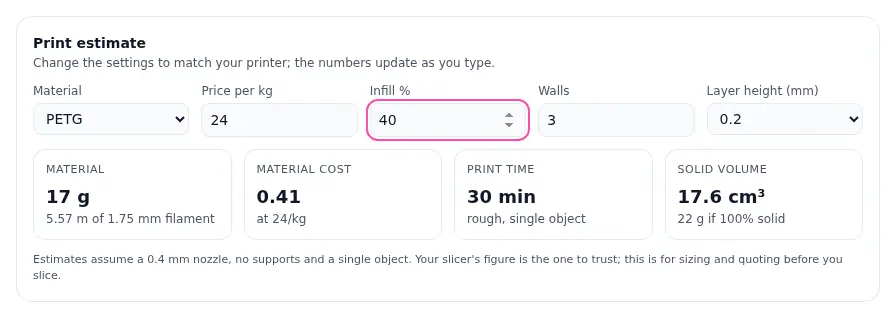
The same numbers answer two everyday questions. How many parts does a spool make? A 1 kg spool divided by 14.9 g is about 67 brackets in PLA, fewer once you allow for a brim, purge and the occasional failed print. What does a batch cost in material? Ten brackets in PETG at 40% infill are 10 × 17 g = 170 g, which at 24 per kilogram is about 4.1.
Resin printers have no infill setting; a solid model is cured solid. When you pick standard resin, the analyzer counts the full volume and shows the result in millilitres as well as grams, using 1.12 g/cm³. Resin slicers can hollow a model and add drain holes, which can cut the resin use a lot on bulky parts, so for resin the solid figure is the upper limit rather than the expected one.
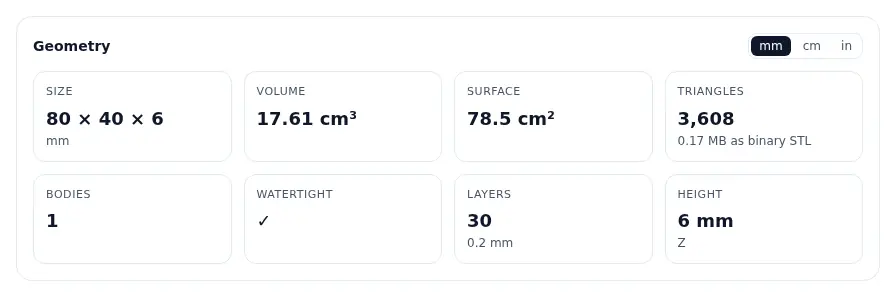
The analyzer reports how many separate bodies a file contains. Weight and cost are additive, so the total for the file is right whether it holds one part or ten. The time estimate assumes a single object, and on a full plate the real time depends on travel between parts, so take it as a lower bound. If you plan to print a large model in pieces, our guide on how to split an STL for a smaller bed covers the cutting; the total weight barely changes, apart from the extra walls each cut face adds.
Volume and solid weight come straight from the geometry and are accurate for a watertight mesh. Everything after that is a model of what a slicer will do. The analyzer assumes a 0.4 mm nozzle, no supports and one object, and supports alone can add a large share on overhanging parts. Its layer count and print time use the model's Z height as it sits in the file, because STL is Z-up. Our bracket is stored lying flat, 6 mm tall, so the analyzer counts 30 layers at 0.2 mm and about 28 minutes. If the file stands a part up that you will print lying down, or the other way round, the time is off; orient the model in the file or the slicer the way it will print, and trust the slicer's time once you have sliced. Use the analyzer to size a part or prepare a quote before you open the slicer, and the slicer's own figure once you have sliced. If the file is too heavy to share, the STL reducer shrinks it without changing the volume noticeably; see STL upload limits for targets.
Multiply the volume in cm³ by the filament density in g/cm³. That gives the weight of a solid print. For a normal print with walls and partial infill the weight is lower; the STL analyzer estimates it from your infill and wall settings.
Manufacturer data sheets give 1.24 g/cm³ for PLA, 1.25 to 1.27 for PETG depending on the brand, and about 1.04 to 1.05 for ABS.
The slicer knows the exact toolpaths, including top and bottom layers, supports, brim and the real infill pattern. The analyzer uses a simpler model of walls plus infill, so treat its number as an estimate before slicing.
No. Walls and top and bottom layers are always solid, so on thin parts most of the plastic is wall and infill changes little. On bulky parts infill matters much more.
Volume is only exact for a closed, watertight mesh. If the STL has open edges, the analyzer still calculates a value but flags it. Repair the mesh to get an exact figure.
What PrusaSlicer, Bambu Studio and Cura mean by open edges, non-manifold edges, reversed faces and floating parts, and how to repair the STL behind them.
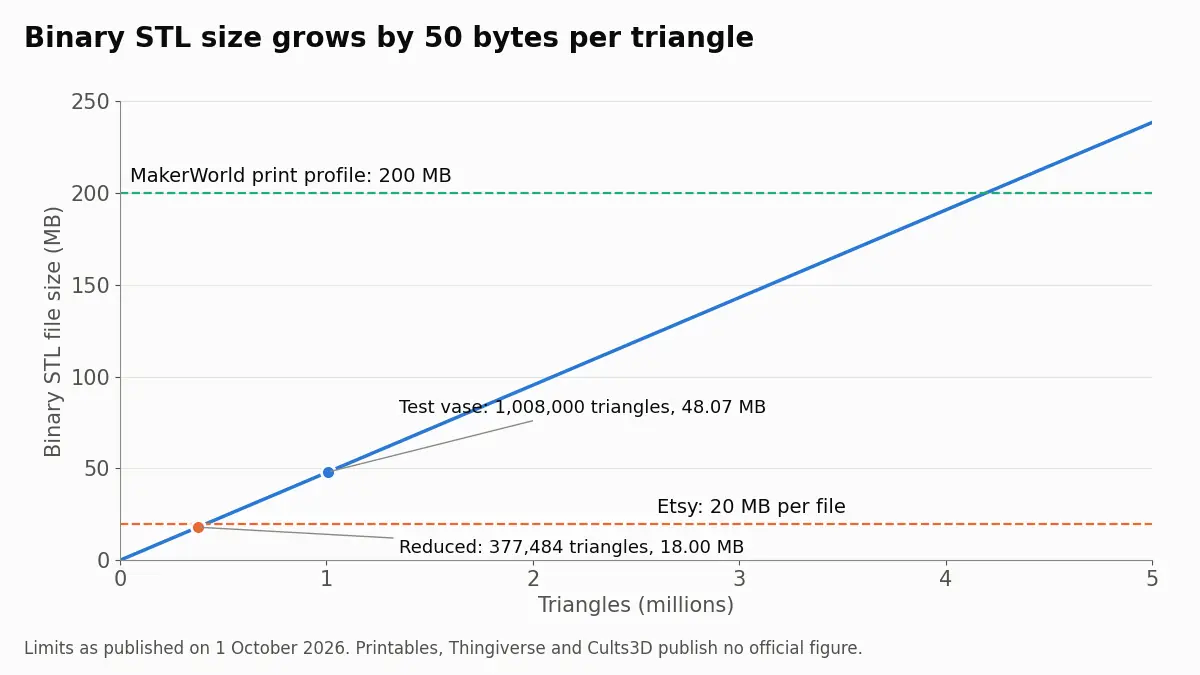
Upload limits on Etsy, MakerWorld, Printables, Thingiverse and Cults3D, checked October 2026, and how to bring an STL under them without losing detail.
Why STL files get large, how to read the triangle count straight from the file size, and what binary, re-export, decimation and 3MF each save in practice.